"My image is blurry, my product won't go live anyway, so why bother." Most people who work with Merchant Center have thought this at least once. And they were right to think it: for years, Google's help page said exactly that: a product with a low-quality image could be kept out of ads and free listings until the image was fixed.
That sentence disappeared from the page around October 11-12, 2026. In its place: the product continues to show in ads and free listings. No announcement, no blog post. The first to notice the change was Hana Kobzová of PPC News Feed, and then Search Engine Roundtable and PPC Land ran the same story. In my view, that silence is the real story.
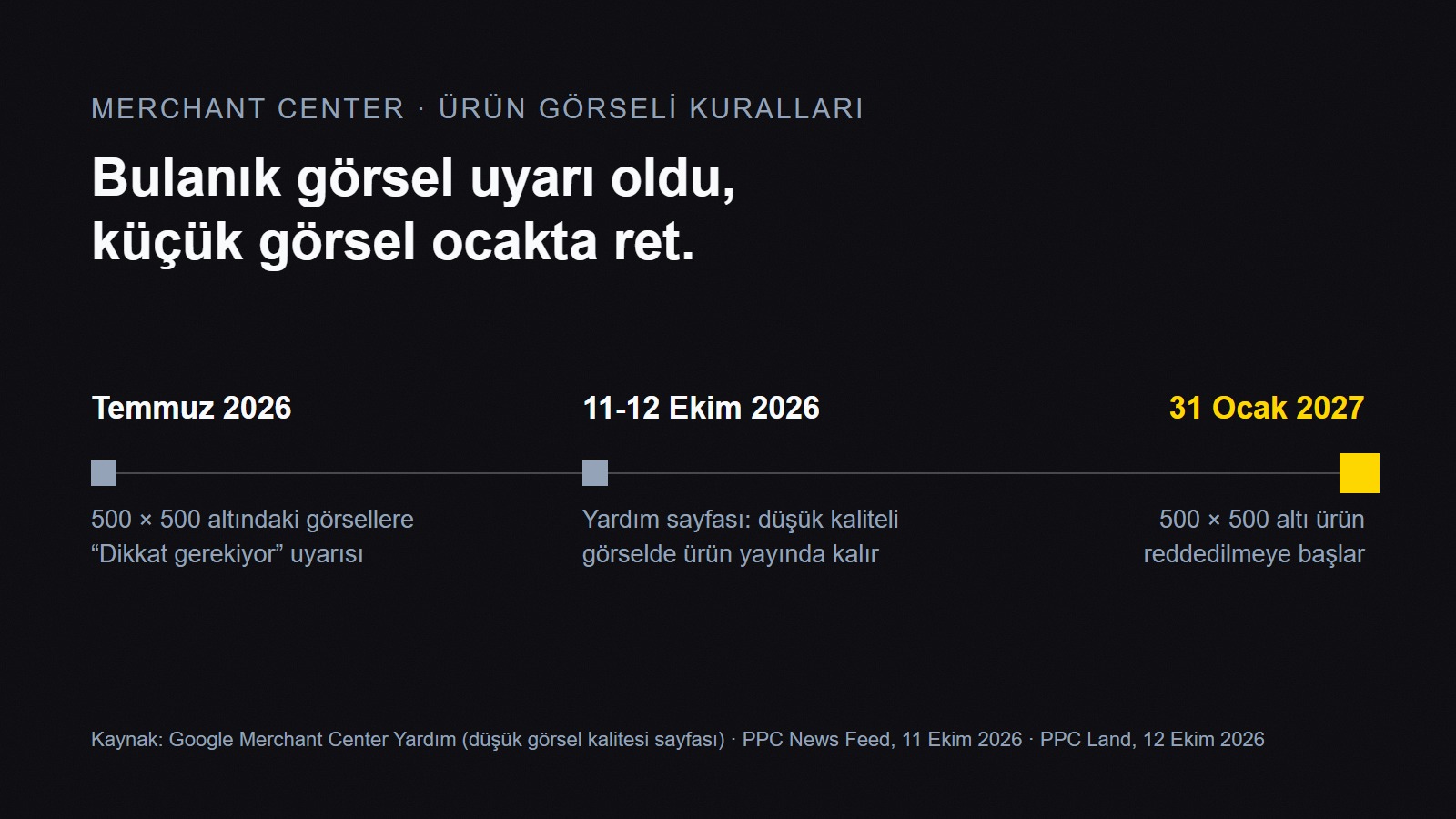
Quick answer: Google changed the help page for Merchant Center's "low image quality" warning: products with blurry, pixelated or low-resolution images now stay live in ads and free listings. This affects e-commerce and catalog businesses that run Google Shopping or Performance Max with Merchant Center. Fix your images anyway: products under 500 × 500 pixels will be disapproved starting January 31, 2027.
What happened?
On Google's help page titled "Low image quality [image_link]," the old wording said a product might not be shown in ads and free listings until its image quality improved. In the new version, the page says it directly: "Your product will continue to show in ads and free listings." [A] The same page adds that high image quality is strongly associated with user engagement and clicks.
The warning flag is still there. It keeps appearing in Merchant Center's "Needs attention" section, and the fix steps haven't changed: replace the image product by product or upload corrected data in bulk. So you can't say the warning is gone; only its penalty got lighter.
There's no date or changelog on the page. Exactly when the old wording was removed isn't clear; the earliest record available is PPC News Feed's story dated October 11. Google hasn't commented so far either. Whether this is a policy relaxation or the correction of an overstated document, I don't know, and I won't speculate.
Why does it matter?
The type of risk changed. The risk used to be "the product quietly drops out." Now the risk is "the product is live but probably performing worse." Those are very different: one is a visible error, the other is a loss nobody notices. [C]
The performance impact is unclear. The page says the image "can improve" performance, but it doesn't give numbers on the effect on ranking, auction competition or selection for free listings. [A]
The 500 × 500 rule stands as is. The new image size requirement is at least 500 × 500 pixels for all product images; enforcement starts January 31, 2027, and products with smaller images are disapproved. Google's recommendation is 1500 × 1500 or larger. [A][C]
Text overlays are still treated harshly. According to PPC News Feed, images with promotional text added, such as price, shipping or a call to action, remain a hard disapproval reason. [C]
By the way, Google has older figures, such as listings with multiple images averaging 76% more impressions (2023 data, Google's own claim); there's no independent verification, so be careful. [C]
What changes for your brand?
Small catalog (50-200 products): No need to panic, but don't put it off. Opening and checking the images one by one will take you an afternoon, which is cheaper than a mass disapproval on January 31.
Large catalog (thousands of products): Start with a size scan: list everything under 500 × 500. Quality issues come second, because they no longer drop the product. If you use images from the manufacturer as is, finding the small ones among them is your job.
If an agency runs your ads: Don't let your agency tell you "we can ignore the quality warning now." The warning is still a signal for performance.
If you never open Merchant Center: If your product data flows to Google from another platform (Shopify, Ticimax, WooCommerce), check whether that platform is shrinking images on your behalf. That's actually where the problem starts more often than not.
Here's my contrarian take: anyone who concludes from this news that "blurry images aren't a problem" has it backwards. People look at that image. Google may keep showing the product, but if the person about to click sees a pixelated box on the screen, they won't click.
Old wording
New wording
Low-quality (blurry, pixelated) image
May be kept out of ads and free listings
Stays live, warning shown
Image under 500 × 500
Warning (since July 2026)
Disapproved from January 31, 2027
How to fix
Replace the image / upload data in bulk
Same
The one thing to do today: In Merchant Center, open Products > Diagnostics, filter the "Image too small" and "Low image quality" warnings separately and note the number of products for each. You don't need to buy anything.
Today's Radar
Some of the rows below are confirmed only at the headline level, not in detail, so keep the difference between what's "known" and what's "interpretation" in mind.
News
Why people are talking about it
Who it affects
Third-party rank tracking tools that monitor Google are struggling (Search Engine Roundtable, October 12)
Google appears to be getting better at blocking scrapers, and ranking data is broken in many tools; actual rankings may not have changed
Anyone who gets their SEO reports from these tools: SEO management
Search Console performance report delayed by more than 64 hours (October 11)
An unusual delay for this report
Teams that pull their weekly report from GSC: SEO management
Google Ads is testing AI-powered goal and asset suggestions (confirmed by Google, October 12)
Google's suggestions may take center stage during campaign setup
Small businesses (SMBs) that set up their own campaigns: Google Ads
AI Overviews often appear for misspelled searches or searches with no matching page (October 12)
When Google can't find a match, it generates an overview
Will my products with blurry images show in ads now?
According to Google's current help page, yes: a low-quality image on its own doesn't drop a product from ads and free listings. But images under 500 × 500 pixels are a reason for disapproval starting January 31, 2027.
Does this change also apply to accounts in Turkey?
The help page isn't written separately by country, so it's expected to apply to accounts in Turkey as well. Still, what you see in the Diagnostics section of your own account is the real evidence.
Is upscaling images with AI a solution?
An upscaled image may pass the size requirement, but Google defines labeling expectations for AI-generated or AI-edited images. Re-exporting from the source file is always safer.
October 5, 2026: starting October 12, Google Ads will automatically add the coupons and discounts on your website to Search and Performance Max ads with a location asset. Who is affected and how to turn the setting off.
On September 24, 2026, Google cut Demand Gen's Shorts and Gmail image ads down to a single tap and announced a Business Agent beta for YouTube. Why you should be cautious about the 40% Gmail figure, and what to do today.
October 14, 2026: Google Ads now lets you rank channels as High or Low priority and cap the low-priority channel's share of budget; in Search campaigns with Display turned on, the old spend distribution goes away in February 2027.
Advertising7 min
We use cookies to improve the site and measure advertising performance. Analytics and advertising cookies run only if you accept them. Details are in our Privacy Policy and Data Protection Notice.