What Is Impeccable? Adding Design Commands and a Detector to Your Coding Assistant: Install, Hooks and Cost
A free kit that teaches a coding assistant such as Claude Code or Cursor to think like a designer: one design skill, 24 commands and a 59-rule detector that finds AI-made design patterns without calling a model. You type a short command such as /impeccable critique; the assistant critiques your page against rules for type, color, spacing and motion, and fixes it if you want. You install it in your project folder with npx impeccable install.
- What it does
- Critiques and fixes interface design
- Type
- Kit: 1 skill, 24 commands, detector
- Where
- Claude Code, Cursor, Codex, Copilot, Gemini CLI and others
- Requirements
- Node.js 22.18 or later
- Hooks
- The installer writes them; can be turned off
- Latest version
- 4.5.2 (09.10.2026)
- Cost
- Free, Apache-2.0
What does Impeccable do?
Interfaces made by AI often come out with the same patterns: the same font everywhere, a purple gradient, nested cards, gray text on gray. Impeccable gives the assistant design commands (for example, choosing a design direction first for a new page, polishing a finished page, or making it bolder or quieter) and runs a detector that finds these patterns after every edit. A skill is a ready-made instruction set that tells the assistant how to do a job.
Who it helps: people who code interfaces with an assistant such as Claude Code or Cursor and don't want the result to look like a template. If you don't write code, it won't help you.
What patterns does Impeccable find?
Tell an assistant "build me a modern website" and you get almost the same look every time: AI repeats the patterns it has seen most often. Even if visitors can't name them, the page looks like a stock template and says nothing about your brand. Impeccable names these patterns, keeps the assistant from falling back on them and finds them in a finished page.
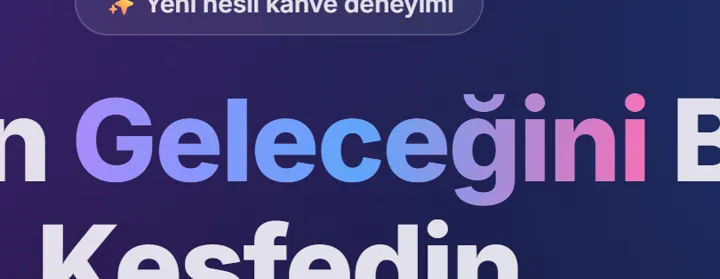


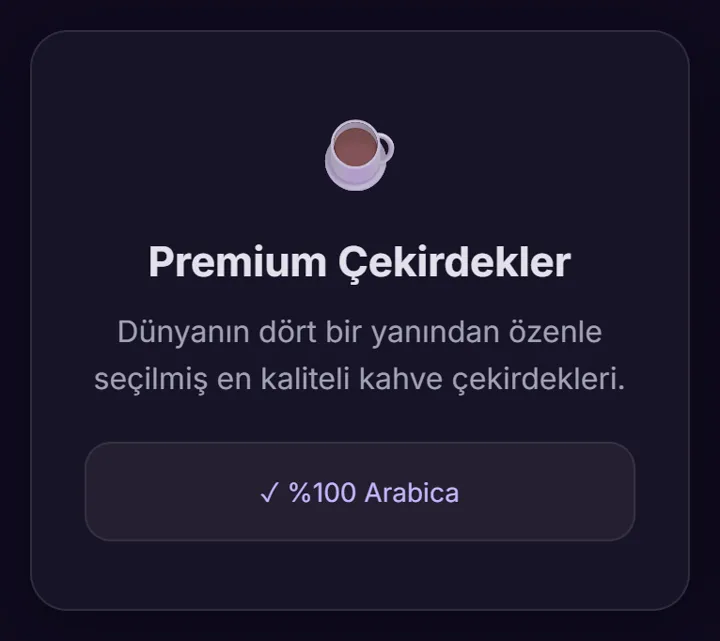

Excerpt from a test pageThe crops come from the "before" page of the test below.
impeccable detect --json index.htmlThe same command after the redesign: 20 findings dropped to 7; of the AI patterns, only 1 border line remained. The other 6 findings are spacing and contrast warnings.
How does Impeccable work?
Three steps: you type, Impeccable gives the assistant design knowledge, you get the result.
› /impeccable critique index.htmlYou type the command into the assistant's chat box. If you type /impeccable without a command, it shows you a fitting menu.SKILL.md + the command's guidetype · color · spacing · motion · bansThe assistant opens that command's guide and reviews your page against these rules. The detector scans for 59 patterns without calling the model.- A scored design review
- A list of the patterns found
- Prioritized fixes
polish, bolder…).What does Impeccable add to the assistant once installed?
critiqueauditpolishbolderquieterdistilltypesetcolorizelayoutanimatehardenclarifyadaptWhat it teaches the assistant:
Clear size and weight steps between headings and body text, readable line length.
Body text at least 4.5:1; on a colored background, text in a shade of the background instead of gray.
Related items close together, wide gaps between groups; more space above a heading than below it.
One deliberate moment of motion instead of effects scattered across the page.
A button says what it will do; an error message states the problem and the fix.
Patterns such as gradient text, decorative glass effects, eyebrow labels and emoji icons.
Source: the Impeccable skill file (SKILL.md and the quality baseline guide, version 4.3.1).
How do you use Impeccable?
Everything goes through a single entry point: /impeccable <command> <target>. Called without a command, it shows a menu that fits the context and never runs a command on its own.
| Job | Command |
|---|---|
| Have a new page or interface designed | init, then /impeccable <describe what you want> |
| Find out what's wrong | critique (design), audit (technical) |
| Adjust a design that is too plain or too noisy | bolder, quieter, distill |
| Type, layout or color problems | typeset, layout, colorize |
| Error screens, empty states, overflowing text | harden, onboard, clarify |
What do the commands change on your page?
Pick a command: see what to type and what will change on your page.
› /impeccable critique home-pageFind out what's wrong. Scores the page and lists the patterns it found and the prioritized fixes. It doesn't change the code.
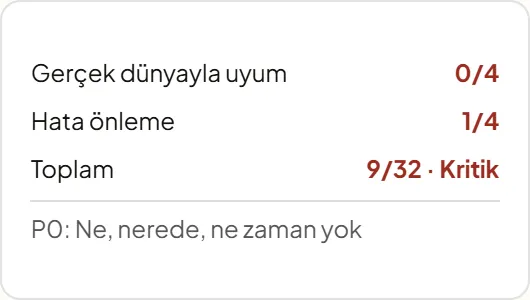
Real outputThe scores on the right come from the real critique report in the Demlik Kahve test.
A real test: what happened to an AI-looking page with Impeccable?
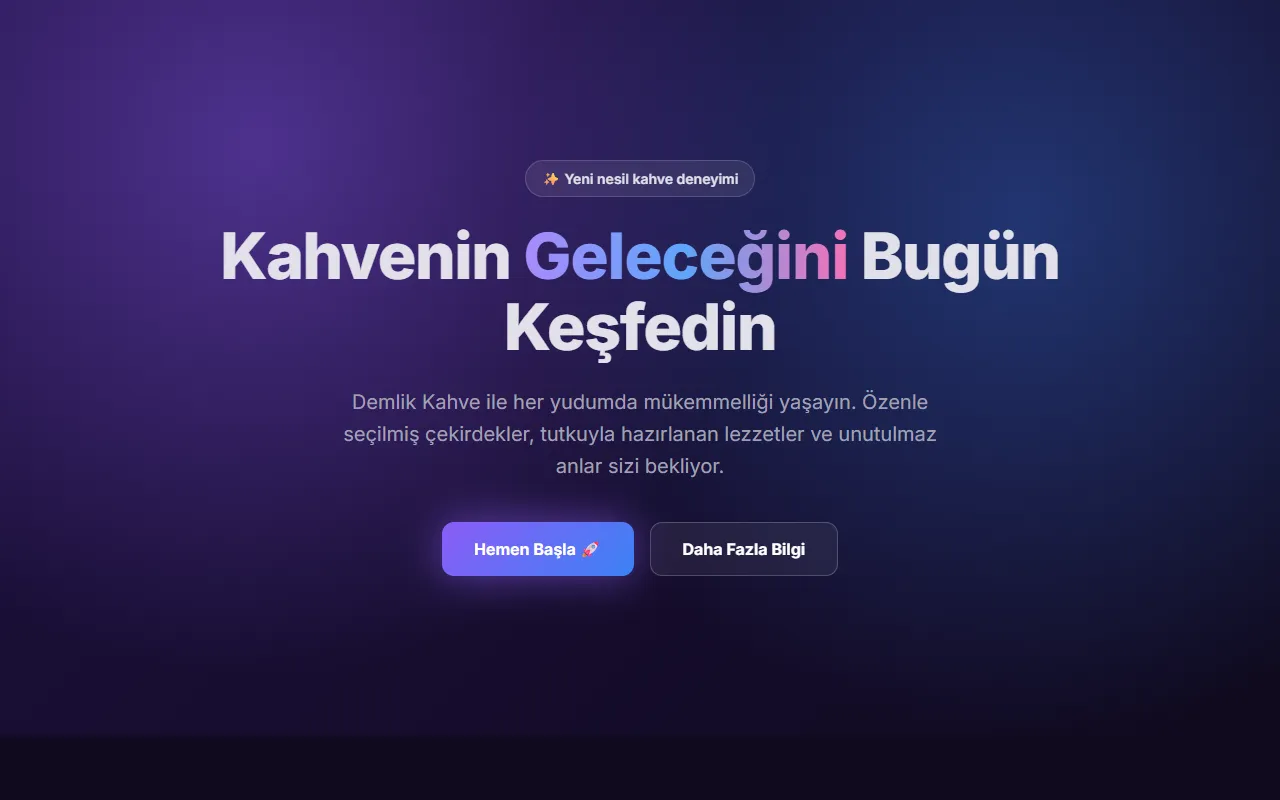
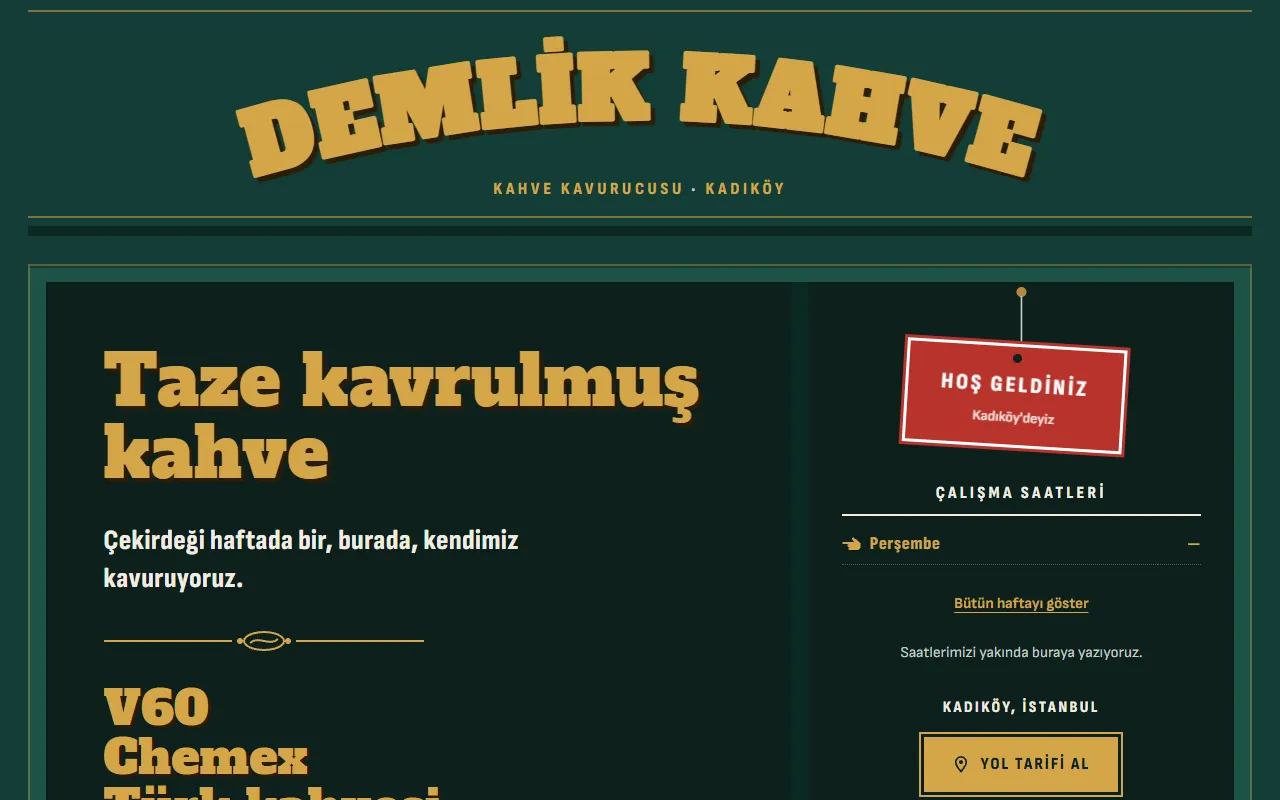
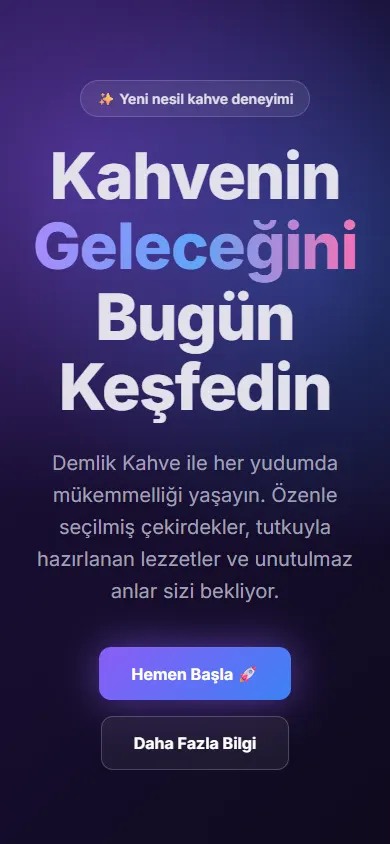
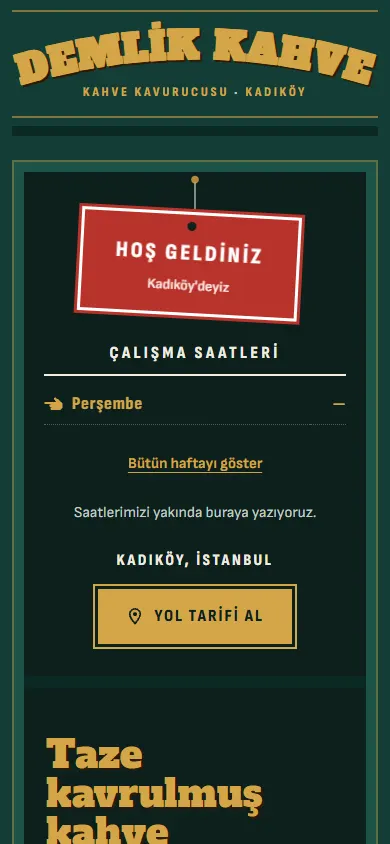
For a fictional neighborhood coffee shop ("Demlik Kahve"), a page was written using the patterns that often appear when assistants are told "build a modern landing page", and Impeccable was run on that page in Claude Code. The before/after image at the top of this page comes from this test.
› /impeccable critique index.htmlResult: 9/32 · Critical (the maximum score is 32 because two of the ten criteria didn't apply to this page). Highlights from the report:
- The page doesn't do its job: a visitor arriving from the map can't find the answer to "what's sold, where, and when is it open".
- Made-up figures: "10K+ Happy Customers", "4.9★", "24/7 Support"; none of them has a source.
- Scrolls sideways on phones: at 390 pixels wide, the page overflows to about 579 pixels.
- Dead buttons: all three buttons go nowhere.
- Originality 0/10: "Swap the name for a software or perfume brand and you wouldn't need to change anything else."
Direction it chose: "shopfront window". The page was built like a shop window seen from the street: what's sold in gold letters on the glass, the hours on the door glass, a sign hanging on the door.
- All the made-up figures were removed and replaced only with real information: weekly roasting, V60, Chemex, Turkish coffee, "one shop".
- Hours, address and phone weren't provided, so none were invented; once hours are entered, the sign on the door switches between "Open / Closed" by itself.
- The purple gradient, glowing button, glass effect, emoji and Inter font are gone; in came lacquer green, gold leaf and sign-painter lettering.
- Instead of dead buttons, a single real action: "Get directions".
| Production record | |
|---|---|
| Date | October 29, 2026 |
| Environment | Claude Code, Impeccable skill 4.3.1 |
| Input | Single-file landing page, deliberately written with common patterns |
| Critique | 9/32 · Critical (two separate assessments: design review and detector) |
| Measurement | Detector with the same command: 20 findings before, 7 after |
| Note | The three questions the skill asked were not answered; the skill inferred the answers from the product note |
Design terms: what does each style look like?
When you ask the assistant for a style, knowing its name is enough. The same coffee shop in eight styles; on each card you can switch between the full-page view and the small card.
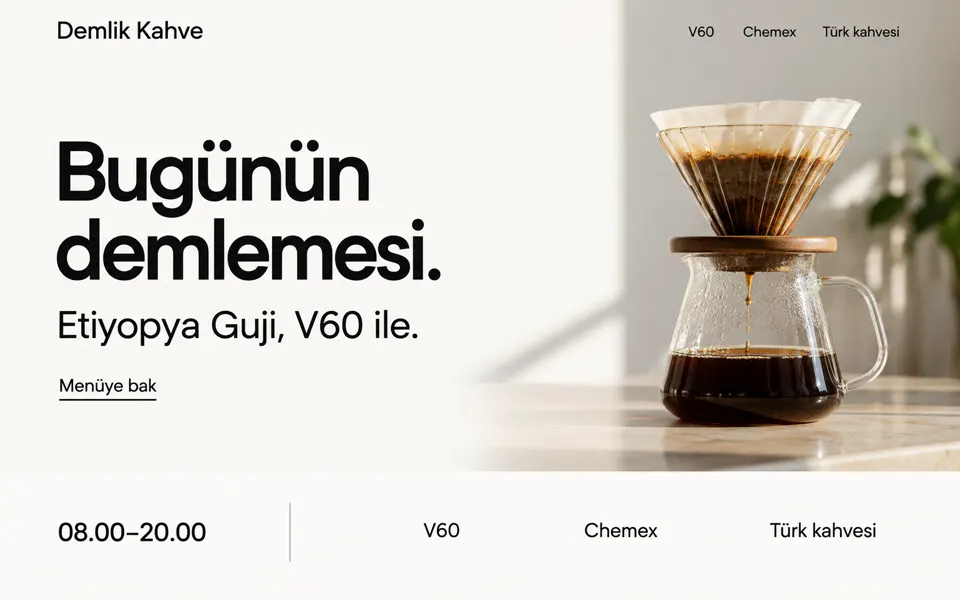
"minimal, lots of white space"
"editorial, magazine layout"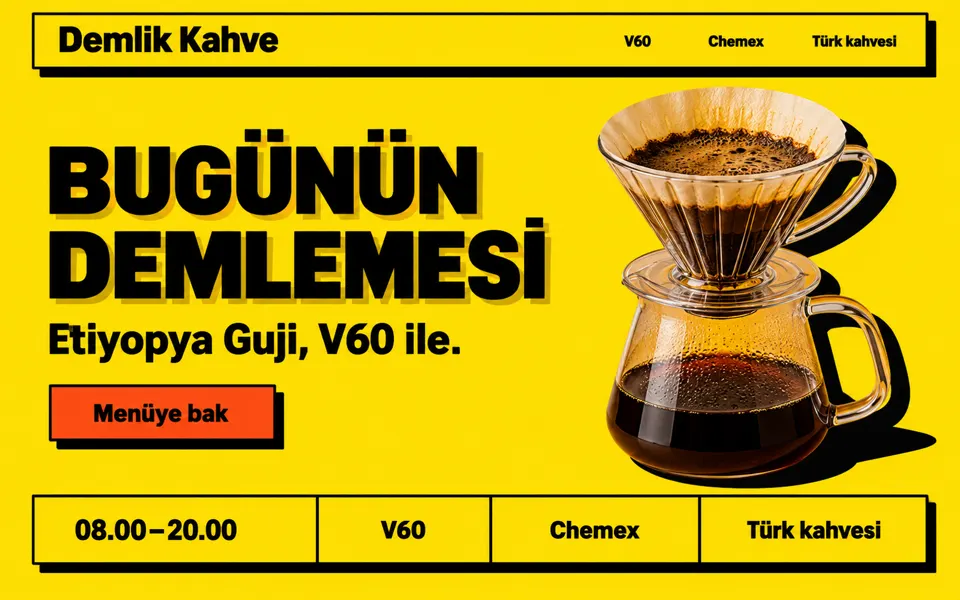
"neo-brutalist"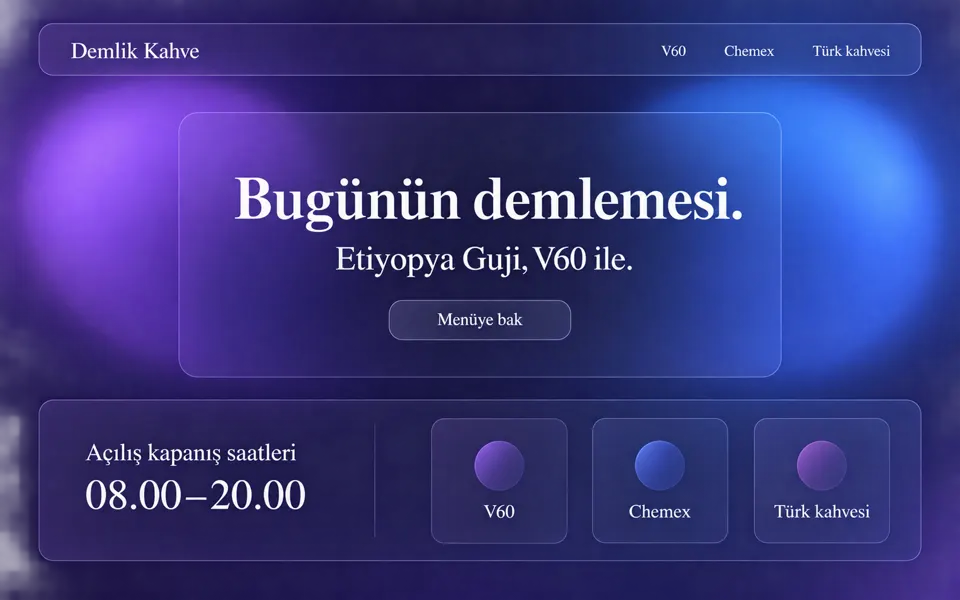
"glassmorphism"
"bento grid"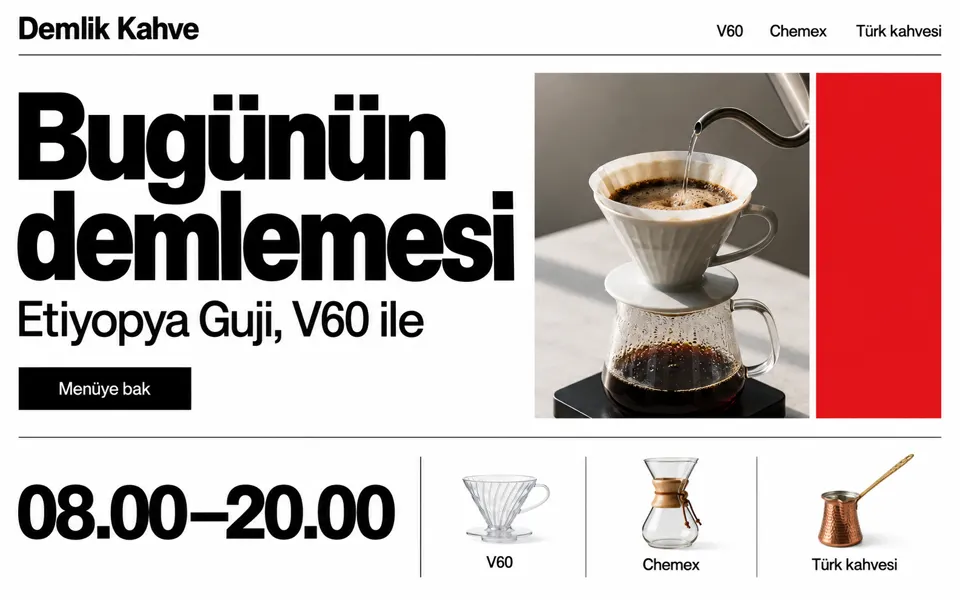
"Swiss style"
"skeuomorphic"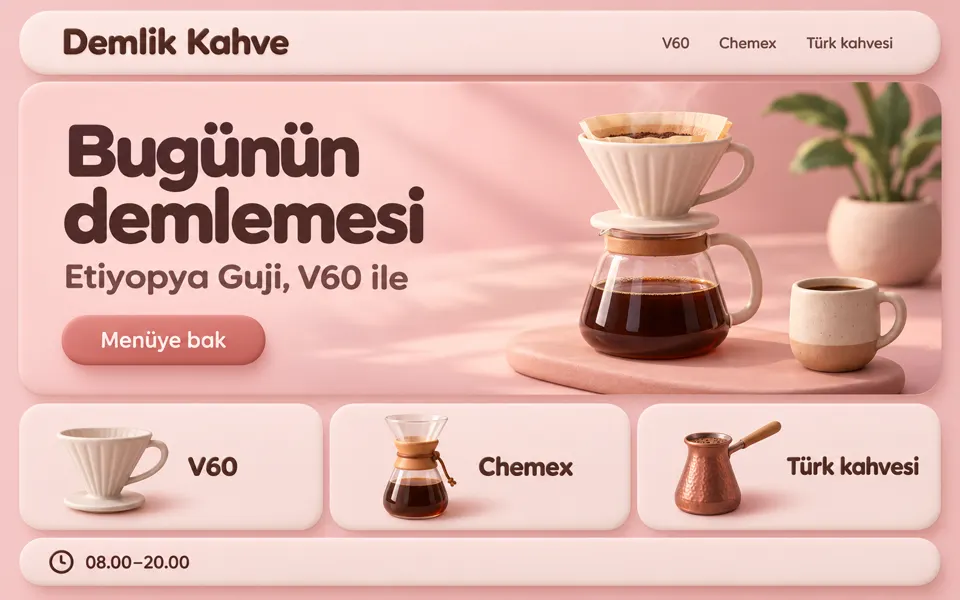
"claymorphism"Card: drawn in codeFull page: ai-generatedBoth are style examples, not Impeccable output. Full-page views made with Codex image generation, October 29, 2026.
How do you install Impeccable?
› npx impeccable install- The installer shows the agent folders it detected; you confirm or change the set, then it asks whether to install for this project or globally.
- Restart the agent; the first command is
/impeccable init($impeccablein Codex).
› npx impeccable install --no-hooksUpdate: npx impeccable update (to check first, npx impeccable check).
› /plugin marketplace add pbakaus/impeccableThen select Impeccable under Discover in the /plugin menu and install it. The plugin brings its own hooks; --no-hooks isn't available on this path, so type /impeccable hooks off to turn them off.
› npx skills add pbakaus/impeccableThe VS Code Copilot extension installs with code --install-extension renaissance-geek.impeccable (VS Code 1.109.3+); for Grok Build, grok plugin install pbakaus/impeccable#plugin --trust; there is also a git submodule route for teams.
Avoid installing two separate Impeccable skills in the same workspace (for example, both the extension and npx).
Which apps does Impeccable work in?
| Claude CodeYes | Plugin or npx; with hooks. Requires workspace trust and a /hooks review. |
|---|---|
| Codex CLIYes | npx installer; the command is $impeccable. After installing, you need to approve the project hook with /hooks. |
| Cursor, GitHub Copilot, Gemini CLI, Grok Build and othersYes | The README lists many agents as supported (including Hermes Agent, OpenCode, Kiro, Trae, Antigravity). |
| WindowsPartly | Windows-specific hook and antivirus-flag issues have been reported on GitHub (below). |
"Not in the documentation" doesn't mean it doesn't work.
Is Impeccable free?
Yes. According to the official FAQ, the public skill, commands, command-line tool and detector engine are free and open source under the Apache-2.0 license. The privacy policy only mentions a waitlist for "Impeccable Pro"; its contents, plan and price appear on no official page. The coding tool and the model are paid for separately; optional image generation is billed separately through the coding tool or your OpenAI API key.
- Using, modifying and distributing it under the Apache-2.0 terms, including commercial use
- Removing the license text and notices from copies
Source: Impeccable FAQ, privacy page, LICENSE. This is not legal advice.
What does Impeccable read and run? Hooks and data
Project code and interface files (the hook scans the edited file after every edit), PRODUCT.md and DESIGN.md. In a URL scan, the structure and styles of the page opened in the browser; in live mode, the element you select.
In the project: PRODUCT.md, DESIGN.md and the .impeccable/ folder; the agent's hook files (such as .claude/settings.local.json, .codex/hooks.json, .cursor/hooks.json); on the machine: ~/.impeccable/ (engine cache and settings). The commands edit source code.
The installer writes hooks that run the detector every time an interface file is edited (in interactive setup it asks; the default is yes). According to the README, installed hooks run independently of the model's tool approval, and on first run the engine binary may be downloaded from GitHub and cached. To turn them off: /impeccable hooks off.
When a new design starts, catalog "direction" cards are fetched from impeccable.style; according to the privacy page, this request can't be turned off; only the anonymous selection report and the version check can.
README: when applying copy edits, live mode runs the optional validation script in package.json with your permissions; don't use live mode in a repository you don't know.
No recorded advisories appear in the GitHub advisory list or in the OSV records for npm; that doesn't mean it is secure.
!Hooks run independently of the coding tool's approval prompts. Before installing, look at what the hook files do; if you don't want them, install with --no-hooks.
Common problems and fixes
| What happens | What to do |
|---|---|
| After installing, /impeccable doesn't appear or the automatic checks are silent | Make sure you chose the right agent and scope (project or global) and restart the agent; in Claude Code, check workspace trust and the /hooks review. |
Reported by users npx impeccable install returns "Could not verify skill bundle: HTTP 404" | An open issue reported at the end of September (#857); a missing digest file in the release is noted as a possible cause. |
| Reported by users Windows security software flags the engine file as a virus | Reported by two users in September 2026 (#740, #814); no official fix has been published. |
| Reported by users Hooks don't work on Windows | Closed issues show that the Codex hook syntax was incompatible with Windows; use the current version. |
How do you turn off or remove Impeccable?
To turn off hooks, use /impeccable hooks off (status: hooks status). You can remove the Claude Code plugin from the /plugin menu. The documentation has no official uninstall command; if you installed with npx, you need to delete the skill files in the agent folders and the hook entries it wrote by hand.
Frequently asked questions
Is Impeccable free?
Yes. The official FAQ says the skill, commands, command-line tool and detector engine are free and Apache-2.0 licensed. The privacy policy only mentions an "Impeccable Pro" waitlist; there is no price.
Which apps does Impeccable work in?
The README lists Claude Code, Cursor, GitHub Copilot, Codex CLI, Gemini CLI, Grok Build, Hermes Agent, OpenCode, Kiro, Trae, Antigravity and other agents as supported. You install it with npx impeccable install.
Does Impeccable run anything on its own once installed?
Yes, hooks: the installer can write hook files that run the detector every time an interface file is edited (the default is yes). These run independently of the model's tool approval.
How do I turn off Impeccable's hooks?
Use npx impeccable install --no-hooks when installing; in the Claude Code plugin, type /impeccable hooks off. You can see the status with hooks status.
Where does my data go with Impeccable?
The detector runs locally. When a new design starts, catalog direction cards are fetched from impeccable.style; according to the privacy page, this request can't be turned off, while the anonymous selection report and the version check can.
Does Impeccable require Node.js?
The npx installer requires Node.js 22.18 or later. The README doesn't say whether Node is needed for the Claude Code plugin path or for the skill itself.
Related guides


Sources
- Impeccable README
- Impeccable website and documentation
- Impeccable FAQ
- Impeccable privacy
- Impeccable GitHub repository
Not clear in the official sources: An official uninstall command · what the engine signature (universal.zip.sig) verifies · the outcome of the Windows antivirus-flag issues · the contents and price of Impeccable Pro (unpublished) · Turkish support. Each is covered in the relevant section, along with what you can do.