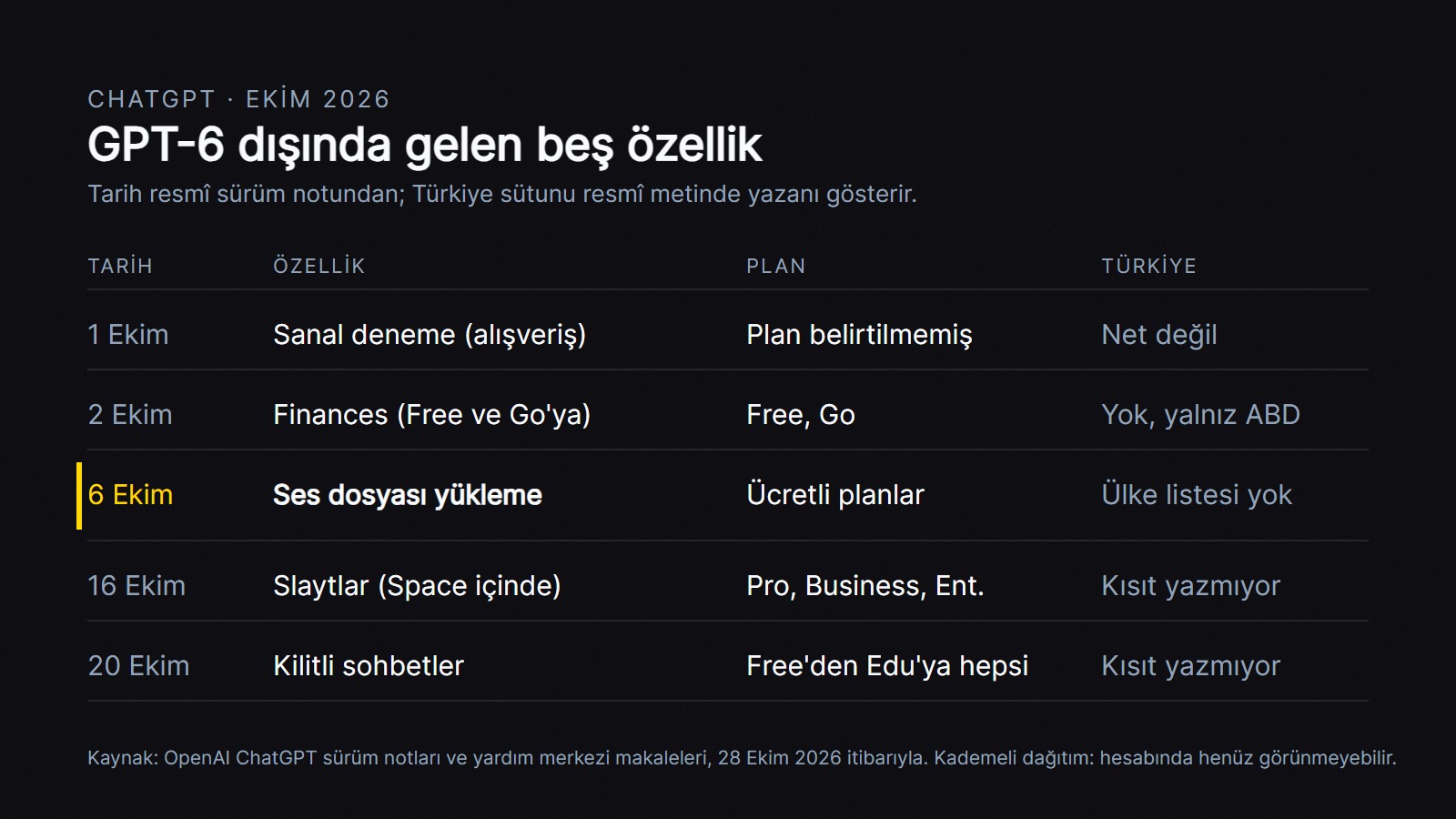
OpenAI's ChatGPT release notes pack fifteen entries into October 1-27. Almost all the talk was about GPT-6, which arrived on October 7, and Intelligent UI, which turns answers into clickable tools; we covered that in a separate post. This post looks at the five features that got buried under all that noise: audio file uploads (October 6), slide creation (October 16), locked chats (October 20), virtual try-on for clothes (October 1), and Finances (October 2).
Frankly, only one of these five is the kind of thing an office worker will actually open and use tomorrow morning. One isn't available from Turkey at all. The rest depend on your plan, and a little on luck; they're all rolling out gradually and may not show up in your account yet. I ranked them based on what OpenAI's own help pages say, not on press speculation.
Source: OpenAI ChatGPT release notes and Help Center, as of October 28, 2026.
What changed?
Audio file uploads (October 6): meeting recordings now go straight into the chat
You attach an audio file to the chat and type what you want: a transcript, a summary, a question like "who said what about the budget," or a draft of the email to send after the meeting [A]. Supported formats are WAV, MP3, M4A, AAC, FLAC, OGG, and audio-only MP4/WebM; the limit is 512 MB per file [A]. MP4 files flagged as video aren't accepted; if it's a screen recording, extract the audio first.
The plan side is clear: it's on for paid subscriptions and business accounts, and not on the free plan [A]. There's no separate line for Turkey; OpenAI only says "Availability may vary by workspace settings, region, client version, and selected model" [A].
Here's how you'd use it tomorrow morning: you record the weekly sales meeting on your phone, upload the M4A file, and say, "List the decisions, the open questions, and who's taking on what as bullet points, then write a short email to the attendees." The help page also warns plainly that transcripts can contain errors, may mix up speakers, and that performance varies by language [A]. No separate accuracy figure has been published for Turkish. Don't send anything to a client without going back to the recording to check the numbers, dates, and names.
Slides (October 16): the presentation lives in ChatGPT, and you edit it with your teammates
It builds a presentation from a chat, a file, or a plain outline; if you give it an old deck as a reference, it matches the layout. You can edit text, images, and charts directly, or select an element and say "shorten this." Your teammates can edit the same deck at the same time and leave comments; from the web, you can export it as PowerPoint, PDF, or Google Slides [A].
There's a catch here. Slides works inside the shared workspace called "Space," and among individual plans Space is only on Pro; it's not on Plus [A]. Pro starts at $100 a month on the US pricing page (as of October 28, 2026) [A]. The desktop app on Windows 10 produces a plain .pptx instead of shared slides; the web version doesn't have this issue [A].
Honestly, I don't think it makes sense to upgrade to Pro just for presentations. If you make one or two decks a month, a tool with a free plan from our atlas, like Gamma or Canva, will do the same job. If your team already uses Business, it's a different story: everything from the meeting recording to the presentation stays in one place.
Locked chats (October 20): peace of mind when you share your screen
It hides the chats you choose from your regular history, your pinned chats, and search; opening them requires a 4-digit account PIN, or Face ID or Touch ID on your phone [A]. It's on every plan from Free to Edu, with no regional restriction listed; because it's rolling out gradually, you may not see it in the menu yet [A].
Don't use it without knowing two things. The lock isn't encryption: OpenAI's retention period, your model training setting, and, if you're on a company account, your admin's audit access all stay exactly the same [A]. The second is more annoying: if you forget your PIN and reset it, all your locked chats and the files attached to them are permanently deleted, and the support team can't bring them back [A]. So write your PIN down somewhere.
Who's it for? Think of it this way: you're presenting to a client by sharing your screen, and the same account also has the chat where you prepped for a salary negotiation last week. In my view that's the feature's only real job, but it does that job well enough.
Virtual try-on (October 1): seeing clothes on yourself before you buy
A "Try on" button appears next to clothing and accessories in ChatGPT's shopping results; you upload a selfie or a full-body photo, and ChatGPT Images draws you wearing the item [A]. The photo is saved for future try-ons; you can delete it in Settings under Personalization [A]. The official note mentions neither a plan nor a country, only "on mobile and web" [A]. One news site reports that it was accessible from Canada [C]. Whether it shows up in Turkey isn't clear from the official source.
I think this feature matters less to a small business employee than to an e-commerce site that sells clothing: your customers can now see your product on themselves in ChatGPT. Don't count on the image to show the fit accurately; the size chart still lives on your site.
Finances (October 2): not available from Turkey
The section where you connect your bank accounts and have ChatGPT interpret your spending, subscriptions, and investments opened to Free and Go users on October 2, but only in the US [A]. Accounts are connected through Plaid, a tool widely used in the US [A]. It's unclear when it will open in Turkey, and I'm not going to speculate.
The five features in one table
Feature
Date
Plan
Turkey
Usefulness
Audio file uploads
October 6
Paid plans, business accounts
No country list, "may vary by region"
High: meeting summaries, call notes
Slides
October 16
Pro, Business, Enterprise (with Space access)
No restriction listed
Medium for teams, low for individuals
Locked chats
October 20
Free, Go, Plus, Pro, Business, Enterprise, Edu
No restriction listed
Medium: for people who share their screen
Virtual try-on
October 1
Not stated in the official note
Not clear from the official source
For clothing e-commerce
Finances (expansion to Free and Go)
October 2
Free, Go (already on Plus and Pro)
No, US only
Not available in Turkey
Dates and plans are from OpenAI's release notes and help pages, as of October 28, 2026.
Who is this useful for?
Sales and project teams: If you're on a paid plan, audio uploads are ready today for summarizing weekly meeting recordings and turning them into task lists.
Consultants, real estate agents, and insurance agents who meet with clients: Getting a transcript of the meeting and having it draft the proposal email. Get consent for the recording at the start of the meeting.
Companies that build presentations as a team: If you're on Business, Slides makes sense. If you work solo, you can skip it.
Clothing e-commerce: Take a look at how your products appear in ChatGPT.
If you want to transcribe a recording without it ever leaving your hands, there's another way: the open-source Whisper from our atlas runs on your own computer. Setting it up isn't as easy as dropping a file into ChatGPT, but the audio never leaves your machine. If you'd like to gather recordings and documents in one place and query them, Gemini Notebook is another option.
What you can try today
0/5
Check off the items; the first shows your plan, the rest show whether it's useful.
Scanning multiple pages into a single PDF with the camera, iOS (October 1)
Update
People who photograph invoices and contracts
Frequently asked questions
Can you upload audio files on ChatGPT's free plan?
No. According to the help page, audio uploads are available on paid subscriptions and business accounts, and not on the free plan for now. If you need to work with recordings on the free plan, a tool that runs on your own computer, like Whisper, makes more sense.
Which plan do you need to make presentations in ChatGPT?
The Slides feature is on Pro, Business, and Enterprise, for accounts with Space access. Because Plus doesn't have Space, it doesn't show up there. If you're on Plus, the PowerPoint plugin listed in the pricing table is a separate route; it opens ChatGPT as a side panel inside PowerPoint.
Are locked chats encrypted, and can OpenAI see what's inside?
It's not an encrypted vault. The lock hides the chat from your screen and from search; the retention period, your model training setting, and the audit access on a company account don't change. The safest approach for truly sensitive information is still not to type it at all.
If you'd like to figure out how to fit these tools into your team's daily work, take a look at our AI consulting page; if you want the flow from meeting recording to CRM set up automatically rather than by hand, see our AI automation page. To see where you stand first: START YOUR FREE ANALYSIS .
OpenAI released GPT-6.1 Terra on October 26, 2026: on the API, one million input tokens cost $1 and output tokens $5, half the price of its predecessor. It's available in ChatGPT Work and Codex on Plus and higher plans.
Google has deprecated Gemini 2.5 Pro and Flash; starting December 1, Gemini API requests are quietly redirected to 3.8 Flash and 3.5 Flash-Lite. What happens to price and quality, and which automations are affected?
Nano Banana 2.1, released by Google on October 6, improved text in images, character consistency and wide aspect ratios; in the API, a 1K image costs $0.0336. Accuracy with Turkish characters isn't clear from the official sources, so test it with your own text before using it on a poster.
+4
We use cookies to improve the site and measure advertising performance. Analytics and advertising cookies run only if you accept them. Details are in our Privacy Policy and Data Protection Notice.





 +1