Visuals in Turkish · the full text is on this page
Tools · Social Media
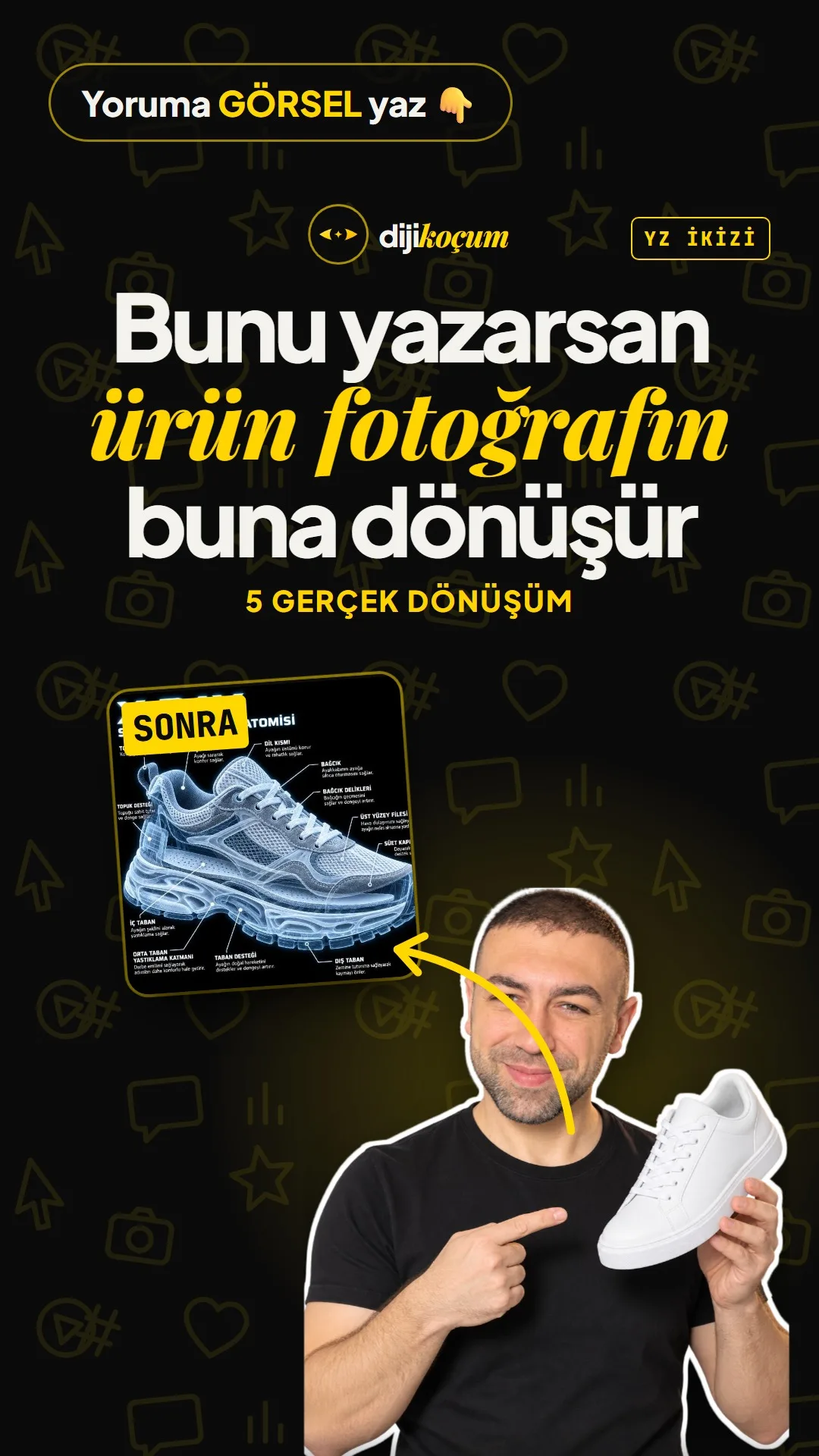
Transform a product photo with 5 ChatGPT prompts: X-Ray, Exploded View, Cutaway, Blueprint, Isometric
A single word won't give you this result; behind each transformation is a full prompt. Upload the photo to ChatGPT, paste the prompt and replace [PRODUCT] with your product.
Short answer
In ChatGPT, one product photo can become five different promotional images: X-Ray (inner layers labeled), Exploded View (parts separated in midair), Cutaway (cut in half, mechanism numbered), Blueprint (navy technical drawing) and Isometric (a 3D model with no text). These are not built-in commands; behind each one is a full prompt, and the image is generated by OpenAI's image model. Since part names and blueprint dimensions are the model's guesses, they should not be used as technical information on a product page. The DijiKoçum PDF gives the full text of the five prompts, what to do if a Turkish label comes out misspelled, and which product to try with which transformation across 12 industries.
5 steps · 2 min read · · Turan Yasin Salcı
Step by step · 5 steps
0/5 checked · saved in this browser only
Choose the photo.
A single product, a plain background, good light; let the product fill the frame. Work with a photo of your own product or one you have permission to use.
Upload it to ChatGPT.
Open a new chat and add the photo with the + button, or drag it in.
Paste the prompt.
Replace [PRODUCT] with the name of your product in CAPITAL LETTERS (e.g. ESPRESSO MACHINE); the headline is written with this name. The X-Ray prompt:
/X-RAY — Turn the product in the photo I uploaded ([PRODUCT]) into an X-ray image with the same angle and pose. Black background; the outer contour semi-transparent, glowing blue-white; all inner layers and parts visible. In the top left, write a large "X-RAY" and below it "[PRODUCT] ANATOMY". Label the inner parts on both sides with thin white lines: each label is a BOLD CAPITALIZED name + 1 line of short description below it. Square (1:1), high resolution, the clarity of a medical illustration. No text other than the labels. Spell every word correctly; legible text; no typos. Keep the identity, colors and angle of the product in the photo exactly the same.Try the other four transformations.
Exploded View works best for products with many parts (machines, tools, furniture), Cutaway for products with a mechanism, Blueprint for products with a clear form, and Isometric for spaces (a home, a shop, a room). The full prompts for all four are in the PDF.
Check the labels.
If a label comes out with a letter error, ask for that fix only: "Keep the image exactly as is, only fix this label: HEEL CUONTER → HEEL COUNTER." If there are many errors, try once more in a new chat; if it still doesn't work, generate it without labels and add the text yourself in Canva.
How to measure it
Try the regular photo and the transformed image of the same product in two separate posts, or as the first slide of a carousel; compare the saves and shares. After a few posts you'll see which transformation stops people in the feed.
Free · PDF
Download the Full text of the 5 prompts and examples for your industry (PDF).
A printable checklist version of the steps on this page. The PDF is in Turkish; no sign-up needed.
Download the checklist (PDF in Turkish)Sources
- DDijiKoçum product photo transformation prompts (5 prompts, 12 industries)Our own data · checked: October 10, 2026
[A] primary source · [B] industry research · [C] practitioner · [D] our own data
Frequently asked questions
Are these words secret commands in ChatGPT?
No. A single word won't produce this result on its own. The images in the video were generated with the full prompt behind the word; you need to paste the prompt exactly as it is.
Does it work with free ChatGPT?
Yes, but the image generation limit is lower on the free plan. OpenAI sets the limit, and it can change.
Are the part names and dimensions in the image accurate?
No, they are the model's guesses. They look great as a promotional image, but don't present them as technical information on a product page. If you know the real dimensions, add them to the prompt.
Next step
Let’s look at your site together.
Free Digital Checkup: a health score for your website, your ads and your visibility in AI search, plus what to fix first. 3 minutes.
More guides

Tools
How to transform product photos with ChatGPT Images 2.5: 20 ready-made image prompts (step by step)
26 steps · 14 min
Tools
5 Free Animation Skills for Claude Code: How to Install Three.js, GSAP, design-dna, LottieFiles and Genjutsu (Step by Step)
16 steps · 9 min

Tools
How to Use the Prompt Library and Prompt Builder: Copy a Ready-Made Prompt, Fill In the Blanks
9 steps · 7 min