Visuals in Turkish · the full text is on this page
Tools · Social Media
Animations from One Sentence with Claude Code: 6 Ready-Made Commands, a Real Test Run and the Resulting Clips (Step by Step)
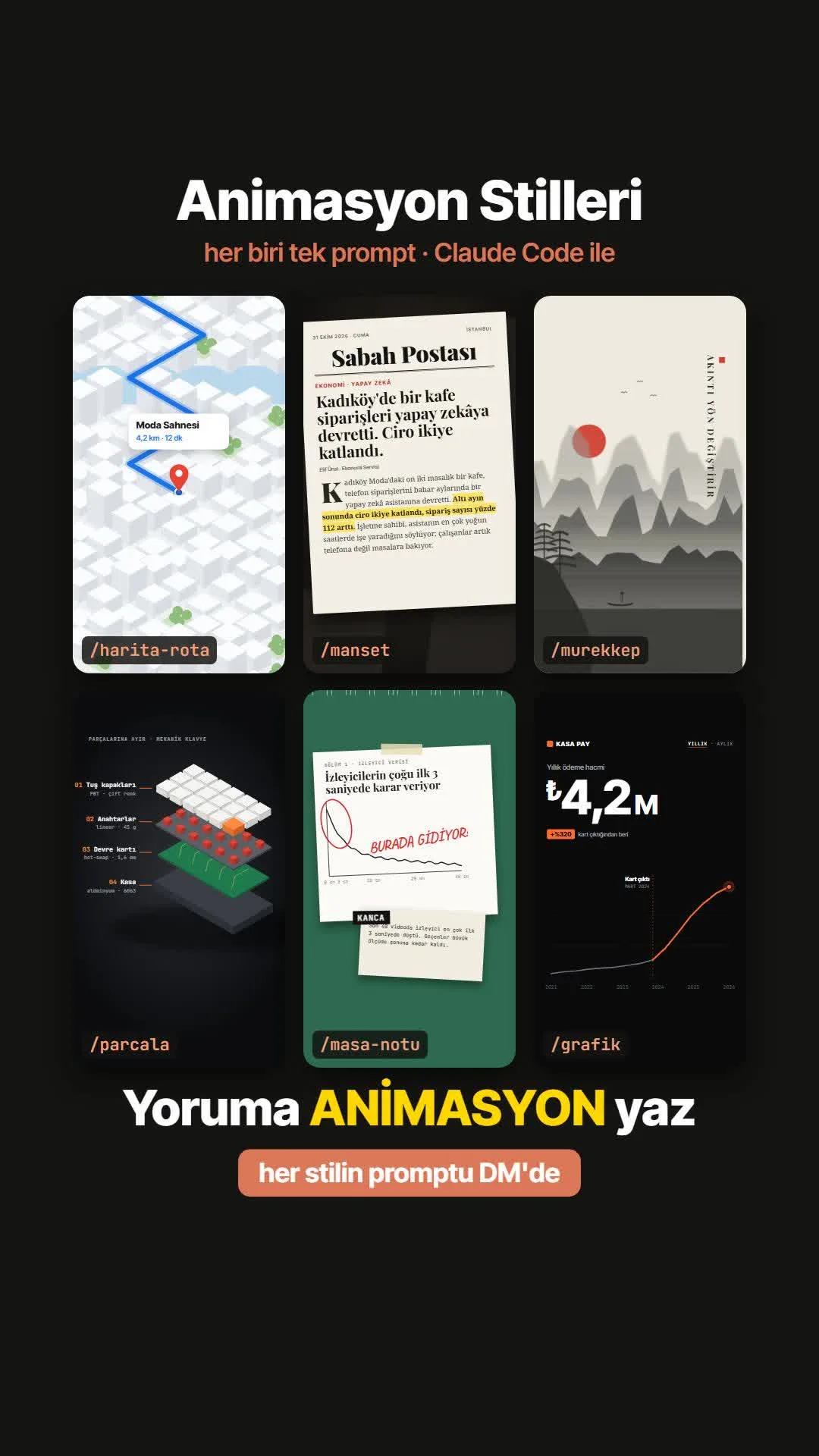
A map route, a newspaper headline, a live chart, a product exploded into layers, a desk note and an ink painting: each one is a single command saved in Claude Code, plus your sentence.
Short answer
A command file you save once in Claude Code turns your own sentence into a vertical animation clip. This guide walks step by step through the full text of six commands, where they go and how to run them, and, from a real test run for a fictional café (Kahve Durağı), what each command produced, how long it took and where it got stuck. The resulting clip is shown under each command.
12 steps · 16 min read · · Turan Yasin Salcı
Step by step · 12 steps
0/12 checked · saved in this browser only
What you'll do: write a sentence, get a 3.5-second animation.
Each of the six animations you saw in the Reels is made with a single command saved in Claude Code. You only write your own sentence; Claude builds the animation in code and gives you a vertical (1080×1920) MP4. You place this clip in your own video at the point where that sentence comes up (B-roll).
The commands were actually tested before this guide was written: a fictional café, "Kahve Durağı" (Moda, Istanbul), wrote 6 sentences for its own Reels, with nothing but its logo to work with. All six commands produced a usable clip. Below are the full text of each command, what was typed, what came out, how long it took and where it got stuck, exactly as it happened.
Set up your computer (once).
- Claude Code: the version of Claude that can write files and run commands on your computer. Setup: code.claude.com.
- Node.js: the LTS version from nodejs.org.
- The animations are made with Remotion (video with React). You don't need to install it separately; Claude downloads it itself the first time. This first download can take a few hundred MB, so if your internet is slow, the first clip takes longer.
To check that the setup is correct, type the following into the terminal; you should see a version number.
node -vSet up the folder: where do the commands go?
Create an empty folder for each project. It will contain two things:
- 01The `.claude/commands/` folder: command files go here. The file name is the command name: the file
grafik.mdbecomes the/grafikcommand. Without this folder, Claude won't recognize/grafikwhen you type it. - 02The `girdi/` folder ("girdi" means input): your logo or the image you want to use. In the test,
girdi/logo.pngwas placed here.
You can create the folders with the commands below, or tell Claude Code "create these folders." Then copy the command texts from the next steps and save them inside
.claude/commands/with the same names.mkdir -p .claude/commands girdi # put your logo in this folder as girdi/logo.png- 01The `.claude/commands/` folder: command files go here. The file name is the command name: the file
How does a command file work? (Do you type it bare, or with a sentence?)
Each command file has two parts: shared rules (vertical 1080×1920, 30 fps, 3.5 seconds, text inside the Instagram/TikTok safe zone, the animation must not freeze, no downloading images from the internet) and a style recipe.
The place in the file that says `$ARGUMENTS` is replaced with your sentence. So you don't type the command bare; you type your own sentence right after the command:
/grafik Kahve Durağı: weekly Instagram orders went from 40 to 180. Our logo: girdi/logo.pngIf you want it to use your logo, just add "Our logo: girdi/logo.png" to the end of the sentence. The result won't be exactly the same every time, but it will be in the same style.
The /harita-rota command (map route)
16 minWhat was typed (translated from Turkish):
/harita-rota Walk from Moda Pier to Kahve Durağı: 350 m, 4 min. Our logo: girdi/logo.pngWhat came out: A white isometric city model opened up, a blue route followed the streets around two corners, a red pin dropped at the destination and a card with the logo opened: "350 m · 4 min".
Note: This isn't a real map; it's a stylized model, and Claude adds the street and neighborhood names itself. Keep that in mind if you want to show a real address.
This clip took 16 minutes to make (worth about $1.28 at API prices; it was run on a subscription). The full text of the command file is below: save it as
.claude/commands/harita-rota.md.--- description: Map route animation --- Create a short animation (B-roll) to be added to the user's video. The user will place this clip at the moment in their own video where that sentence comes up. Using Remotion, build a 1080×1920 (vertical), 30 fps, roughly 3.5-second animation and render it as an MP4 (output: out/video.mp4). Keep text inside the Instagram/TikTok safe zone (200 pixels in from the top, 360 from the bottom, 64 from the sides). The animation must never freeze: when the main motion ends, the camera should keep pushing in very slowly. Don't download images from the internet; draw the scene with code. If the user provided an image (e.g. girdi/logo.png), copy it into the public/ folder and use it in a suitable place in the scene (logo, brand area, card). If information is missing, make a reasonable assumption and briefly state what you assumed at the end. The user's sentence: $ARGUMENTS Style: Draw a white, minimal, isometric 3D city model: blocks of different heights, streets between them, a light blue river running diagonally across and a few green parks. Draw a thick blue route that follows the streets from the starting point to the destination in the user's sentence; at the tip of the route, put a blue dot that pulses like a heartbeat. When the route finishes, a red location pin should bounce down onto the destination and a white card should open next to it: destination name · distance · time. The camera should follow the tip of the route smoothly while pushing in slightly. Neighborhood names should sit on the map in small gray text.The /manset command (newspaper headline)
12 minWhat was typed (translated from Turkish):
/manset Kadıköy's new favorite, Kahve Durağı, doubled its weekly customers with Instagram orders. Our logo: girdi/logo.pngWhat came out: A cream newspaper page dropped onto a desk: a "Kadıköy Postası" masthead, a large serif headline, our logo and a yellow highlighter marking the supporting sentence.
Note: Because no numbers were given in the sentence, Claude made up numbers for the paragraph on its own ("from 350 to 700"). If you have real numbers, be sure to put them in the sentence.
This clip took 12 minutes to make (worth about $0.82 at API prices; it was run on a subscription). The full text of the command file is below: save it as
.claude/commands/manset.md.--- description: Newspaper headline animation --- Create a short animation (B-roll) to be added to the user's video. The user will place this clip at the moment in their own video where that sentence comes up. Using Remotion, build a 1080×1920 (vertical), 30 fps, roughly 3.5-second animation and render it as an MP4 (output: out/video.mp4). Keep text inside the Instagram/TikTok safe zone (200 pixels in from the top, 360 from the bottom, 64 from the sides). The animation must never freeze: when the main motion ends, the camera should keep pushing in very slowly. Don't download images from the internet; draw the scene with code. If the user provided an image (e.g. girdi/logo.png), copy it into the public/ folder and use it in a suitable place in the scene (logo, brand area, card). If information is missing, make a reasonable assumption and briefly state what you assumed at the end. The user's sentence: $ARGUMENTS Style: A cream-colored newspaper page should drop onto a dark, slightly blurred desk surface, rotating slightly, and settle with its shadow. On the page: a bold serif newspaper masthead (make up a fictional name), a date line, thin rules, a small kicker, a large serif headline from the user's sentence, a byline and two paragraphs with a drop cap. A yellow highlighter should sweep left to right over the sentence in the paragraph that supports the headline, coloring it line by line. The camera should slowly push in toward the highlight.The /grafik command (live chart)
7 minWhat was typed (translated from Turkish):
/grafik Kahve Durağı: weekly Instagram orders went from 40 to 180 after starting Reels (June 2026). Our logo: girdi/logo.pngWhat came out: On a black panel, a counter counted from 40 to 180, with an orange "350%" badge next to it (the math is correct), a dashed line at June 2026 and a rising orange chart.
Note: The start and end numbers are exactly as given; Claude draws the curve for the months in between on its own. If the in-between values matter, include them too.
This clip took 7 minutes to make (worth about $0.64 at API prices; it was run on a subscription). The full text of the command file is below: save it as
.claude/commands/grafik.md.--- description: Live chart / counter animation --- Create a short animation (B-roll) to be added to the user's video. The user will place this clip at the moment in their own video where that sentence comes up. Using Remotion, build a 1080×1920 (vertical), 30 fps, roughly 3.5-second animation and render it as an MP4 (output: out/video.mp4). Keep text inside the Instagram/TikTok safe zone (200 pixels in from the top, 360 from the bottom, 64 from the sides). The animation must never freeze: when the main motion ends, the camera should keep pushing in very slowly. Don't download images from the internet; draw the scene with code. If the user provided an image (e.g. girdi/logo.png), copy it into the public/ folder and use it in a suitable place in the scene (logo, brand area, card). If information is missing, make a reasonable assumption and briefly state what you assumed at the end. The user's sentence: $ARGUMENTS Style: A black panel: a brand name at the top left, "MONTHLY · YEARLY" tabs at the top right, the metric name below. A large counter should count smoothly from the starting value to the ending value in the user's sentence. Next to it, an orange badge: the percentage change. At the bottom, a line chart by year should draw from left to right: gray up to the event point in the sentence, orange and steep after it; a dashed vertical line and a label at the event point, and an orange dot pulsing like a heartbeat at the tip.The /parcala command (exploded view)
17 minWhat was typed (translated from Turkish):
/parcala Break a latte down into its layers: milk foam, steamed milk, espresso, glass cupWhat came out: The latte glass split into four layers, each with a numbered label next to it, and our logo above the glass. This was the best result of the test.
Note: Even though no logo was mentioned in the sentence, Claude used it on its own because there was a logo in the folder.
This clip took 17 minutes to make (worth about $1.31 at API prices; it was run on a subscription). The full text of the command file is below: save it as
.claude/commands/parcala.md.--- description: Product exploded-view animation --- Create a short animation (B-roll) to be added to the user's video. The user will place this clip at the moment in their own video where that sentence comes up. Using Remotion, build a 1080×1920 (vertical), 30 fps, roughly 3.5-second animation and render it as an MP4 (output: out/video.mp4). Keep text inside the Instagram/TikTok safe zone (200 pixels in from the top, 360 from the bottom, 64 from the sides). The animation must never freeze: when the main motion ends, the camera should keep pushing in very slowly. Don't download images from the internet; draw the scene with code. If the user provided an image (e.g. girdi/logo.png), copy it into the public/ folder and use it in a suitable place in the scene (logo, brand area, card). If information is missing, make a reasonable assumption and briefly state what you assumed at the end. The user's sentence: $ARGUMENTS Style: On a dark studio backdrop with a lit center, the product from the user's sentence should stand in isometric view, then separate into its layers, spreading apart vertically. Next to each layer, a label connected by a thin line: an orange number and a short description ("01 …", "02 …"), in monospace text. The layers should separate one after another, with a slight delay; the product should rotate very slowly.The /masa-notu command (desk note)
26 minWhat was typed (translated from Turkish):
/masa-notu Half the people who watch our videos skip in the first 3 seconds, so we always show the coffee in the first frameWhat came out: A taped note sheet arrived on a green cutting mat: a line chart, a circle in red pen, a handwritten note and a second sheet labeled "KANCA" (hook).
Note: The typewriter text at the bottom didn't fit into 3.5 seconds, and the last sentence was cut off. The fix: send a second message in the same chat saying "make the typewriter text finish at 2.5 seconds."
This clip took 26 minutes to make (worth about $1.04 at API prices; it was run on a subscription). The full text of the command file is below: save it as
.claude/commands/masa-notu.md.--- description: Desk note (data) animation --- Create a short animation (B-roll) to be added to the user's video. The user will place this clip at the moment in their own video where that sentence comes up. Using Remotion, build a 1080×1920 (vertical), 30 fps, roughly 3.5-second animation and render it as an MP4 (output: out/video.mp4). Keep text inside the Instagram/TikTok safe zone (200 pixels in from the top, 360 from the bottom, 64 from the sides). The animation must never freeze: when the main motion ends, the camera should keep pushing in very slowly. Don't download images from the internet; draw the scene with code. If the user provided an image (e.g. girdi/logo.png), copy it into the public/ folder and use it in a suitable place in the scene (logo, brand area, card). If information is missing, make a reasonable assumption and briefly state what you assumed at the end. The user's sentence: $ARGUMENTS Style: A taped white note sheet should arrive on top of a green cutting mat with measurement lines: a small kicker, a title from the user's sentence and a line chart that looks hand-drawn. A circle should be drawn in red pen around the critical point on the chart, with a short handwritten note next to it. A second, smaller sheet should slide in from the bottom: a one-word label on black label tape, with a two-sentence explanation in typewriter text below it.The /murekkep command (ink painting)
13 minWhat was typed (translated from Turkish):
/murekkep Good coffee doesn't rushWhat came out: On cream paper, an ink blot spread and turned into misty mountains, a red sun and a boat; on the right, our sentence in vertical text and the logo.
Note: In batch (terminal) mode, Claude started the render in the background and closed the session, so no video was created. Going into the folder and running the
npm run rendercommand Claude had set up produced the output. In a normal chat, Claude waits for the render to finish, so this problem doesn't happen.This clip took 13 minutes to make (worth about $0.98 at API prices; it was run on a subscription). The full text of the command file is below: save it as
.claude/commands/murekkep.md.--- description: Ink painting animation --- Create a short animation (B-roll) to be added to the user's video. The user will place this clip at the moment in their own video where that sentence comes up. Using Remotion, build a 1080×1920 (vertical), 30 fps, roughly 3.5-second animation and render it as an MP4 (output: out/video.mp4). Keep text inside the Instagram/TikTok safe zone (200 pixels in from the top, 360 from the bottom, 64 from the sides). The animation must never freeze: when the main motion ends, the camera should keep pushing in very slowly. Don't download images from the internet; draw the scene with code. If the user provided an image (e.g. girdi/logo.png), copy it into the public/ folder and use it in a suitable place in the scene (logo, brand area, card). If information is missing, make a reasonable assumption and briefly state what you assumed at the end. The user's sentence: $ARGUMENTS Style: On a cream paper texture, an ink blot should spread open from the center and turn into a traditional East Asian ink painting landscape: layer upon layer of misty gray mountains, a red sun, a small boat on the water, a few birds in flight. On the right side, the user's sentence should appear letter by letter in vertical text. Colors: only black-gray tones and a single red. The camera should drift very slowly horizontally.How were all six run in a batch from the terminal?
Instead of opening a chat for each one, the six commands were run from the terminal. Each command in its own empty folder, three at a time.
claude -pruns Claude Code without opening a chat, with the single prompt you give it; when it's done, it writes the result to a file.- Each clip took between 7 and 26 minutes; all six took about 91 minutes in total.
- The total API equivalent was about $6; it was run on a Claude subscription.
- This method is for producing several clips without waiting. For a single clip, a normal chat is easier, since you can fix whatever it gets stuck on right away.
The command used for one folder is below. The folder must already contain
.claude/commands/andgirdi/.claude -p "/grafik Kahve Durağı: weekly Instagram orders went from 40 to 180. Our logo: girdi/logo.png" \ --permission-mode acceptEdits \ --allowedTools "Bash" "Read" "Write" "Edit" \ --output-format json > result.jsonPut the clip in your own video and have it fixed.
The clip comes out as
out/video.mp4. In CapCut, InShot or whatever editing app you use, drag it to the point in the video where that sentence comes up.If there's something you don't like, write it as a second message in the same chat, and Claude will fix the code and render again. Examples:
- "Make the text finish at 2.5 seconds."
- "Change the colors to my brand's navy and yellow."
- "Make the number 210, not 180."Three rules from the test:
1. Put the real number and name in the sentence; if you don't, Claude makes up something plausible.
2. If some text is cut off when the clip ends, have it fixed by stating the timing.
3. The result isn't exactly the same every time; keep the folder of a clip you like and use it as the base later.
How to measure it
For one week, add a single animation made with one of these commands to each of your Reels. Compare the share of viewers who stay past the first 3 seconds ("watch time" in Instagram Insights) for videos with and without animation.
Sources
- AClaude Code: Slash commandsPrimary source · checked: October 31, 2026
- AClaude Code: Set up Claude CodePrimary source · checked: October 31, 2026
- ARemotion documentationPrimary source · checked: October 31, 2026
- DDijiKoçum test log (October 31, 2026, 6 commands, empty folder)Our own data · checked: October 31, 2026
[A] primary source · [B] industry research · [C] practitioner · [D] our own data
Frequently asked questions
Do I type the command bare, or with a sentence?
With a sentence. You type your own sentence right after the command: "/manset Kadıköy's new favorite…". The $ARGUMENTS spot in the command file is filled with your sentence.
If someone types the same command, will they really get the same animation?
They'll get the same style, not an exact copy. Claude rewrites the code every time. The clips in this guide are what came out the first time the commands were run in an empty folder.
Do I need to know how to code?
No. You just need to copy the command file, save it in the right folder and write your sentence. If you get stuck, you can also tell Claude Code "set up this folder."
Does it cost anything?
The commands are free. Claude Code works with Claude's paid plans or with the API; in the test, the six clips came to about $6 at API prices, and they were run on a subscription.
Why does it take so long?
Claude builds the scene in code, checks the frames and renders it; one clip took 7–26 minutes. Because Remotion is downloaded the first time, the first clip takes longer.
Next step
Let’s look at your site together.
Free Digital Checkup: a health score for your website, your ads and your visibility in AI search, plus what to fix first. 3 minutes.
More guides

Tools
How to transform product photos with ChatGPT Images 2.5: 20 ready-made image prompts (step by step)
26 steps · 14 min

Tools
5 Free Animation Skills for Claude Code: How to Install Three.js, GSAP, design-dna, LottieFiles and Genjutsu (Step by Step)
16 steps · 9 min

Tools
How to Use the Prompt Library and Prompt Builder: Copy a Ready-Made Prompt, Fill In the Blanks
9 steps · 7 min