Visuals in Turkish · the full text is on this page
How-To Guide · Social Media
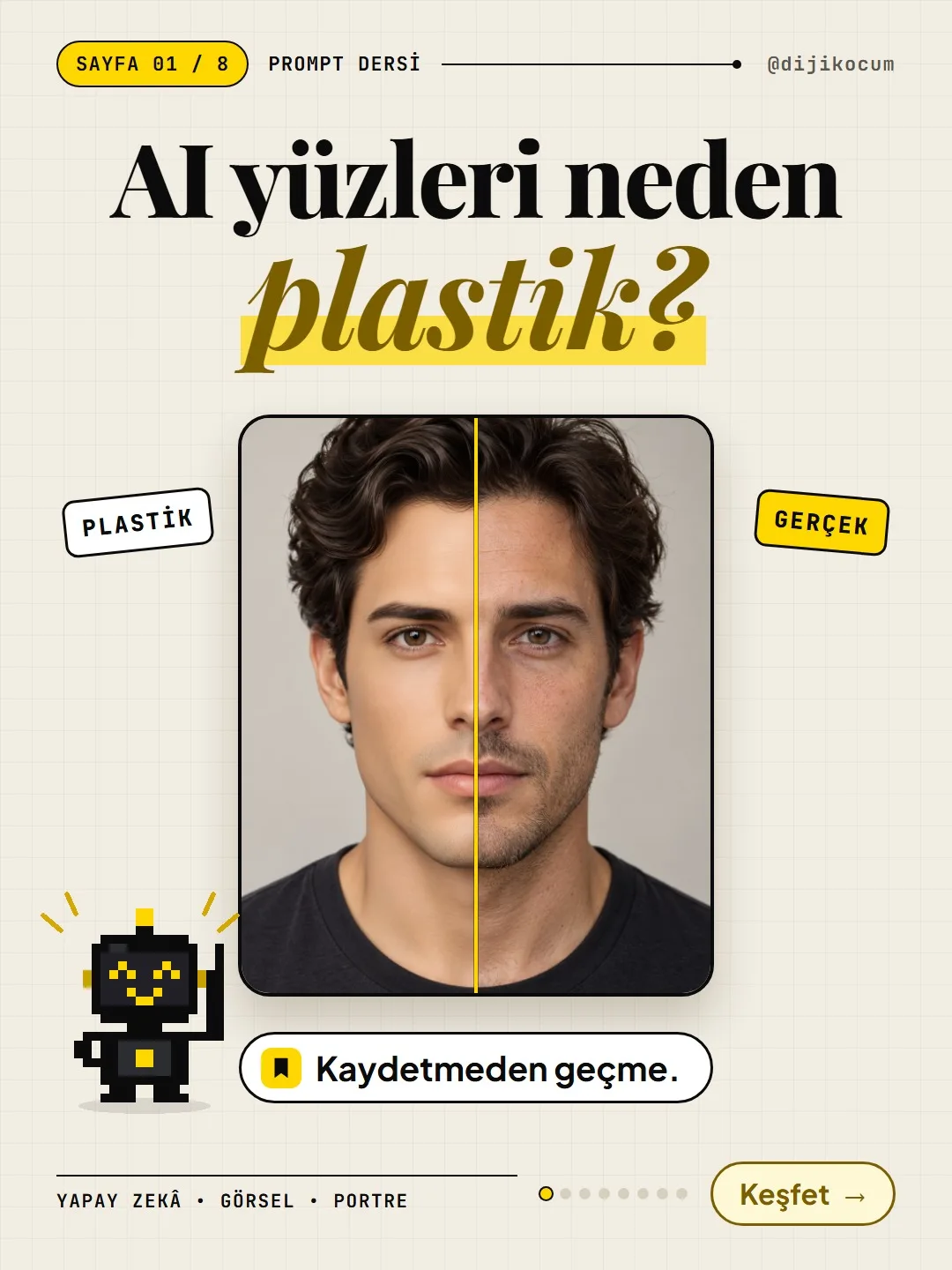
Why Do AI Faces Look Plastic? A 10-Term Realistic Portrait Glossary and a Ready-Made Prompt Template
"4K" and "hyperrealistic" iron the skin flat. Pores, light passing through skin, film grain and the right light angle are what make a face look real.
Short answer
AI faces often look plastic because words like "4K," "hyperrealistic" or "perfect skin" iron the skin flat. Realism is in the imperfections: pores, moles, light passing through the skin, film grain, the right light angle. This page gives you a 10-term portrait glossary, a one-piece template, and ready-made prompts for a hair salon, a photographer and a boutique. Every generation produces a different face, while the texture and style stay similar.
15 steps · 7 min read · · Turan Yasin Salcı
Step by step · 15 steps
0/15 checked · saved in this browser only
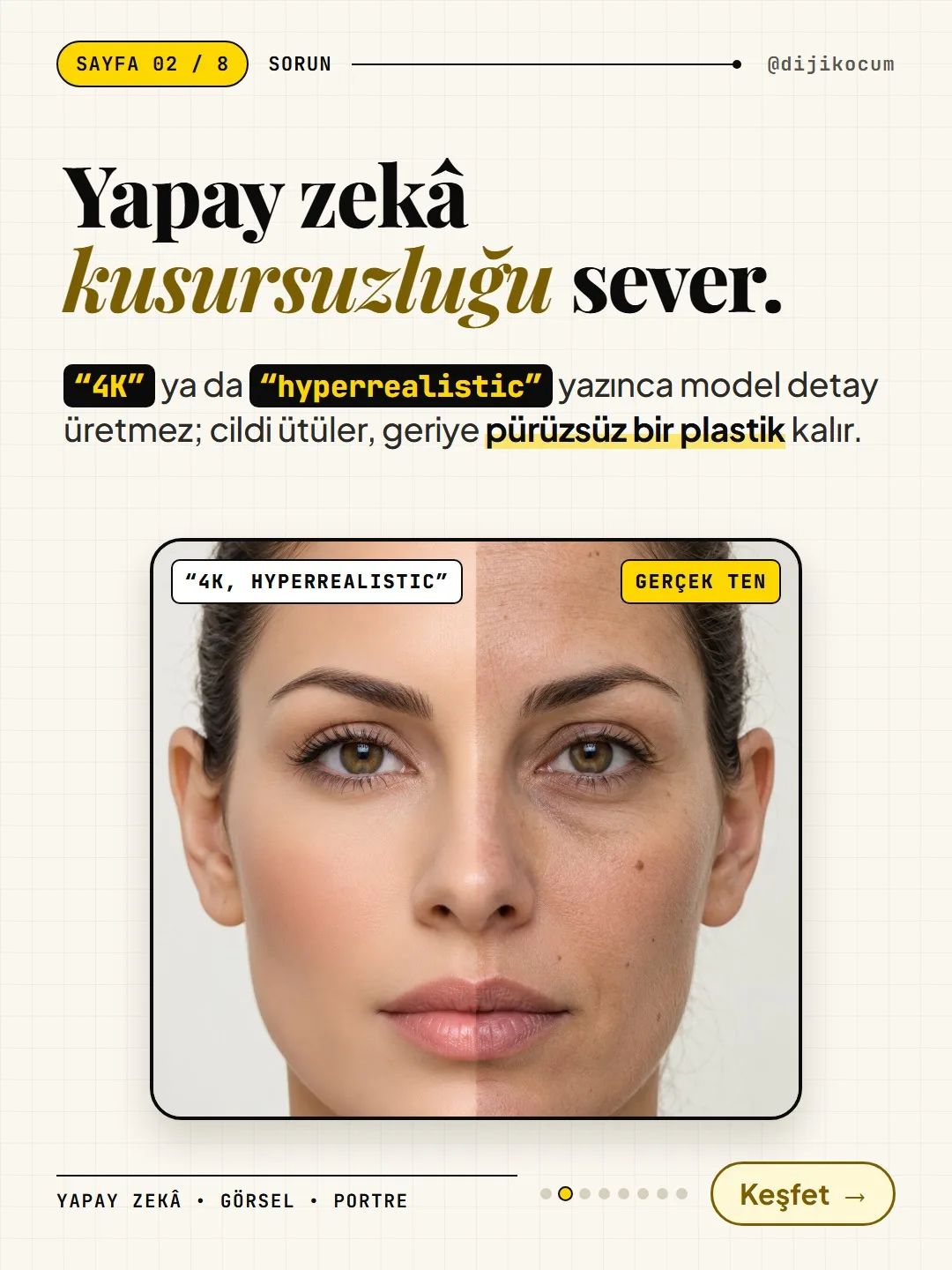
The problem: AI loves perfection.
When you write "4K" or "hyperrealistic" in your prompt, the model doesn't produce detail; it irons the skin, and what's left is smooth plastic. The face looks like a mannequin, and viewers notice it at a glance. The solution isn't asking for quality, it's describing the imperfections and camera details that a real photo has. The next four steps are the four terms in the carousel.
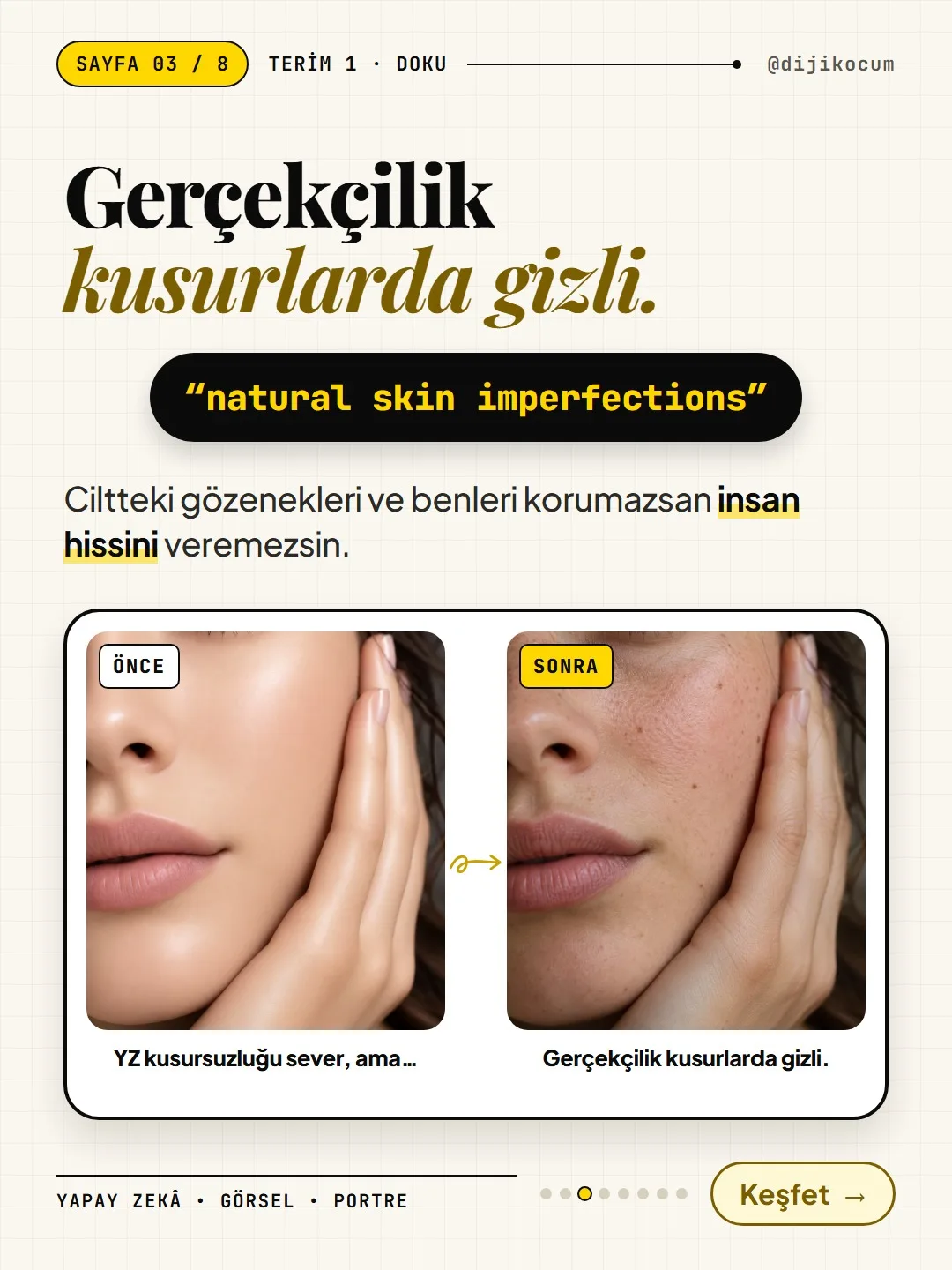
Term 1 · Texture: natural skin imperfections
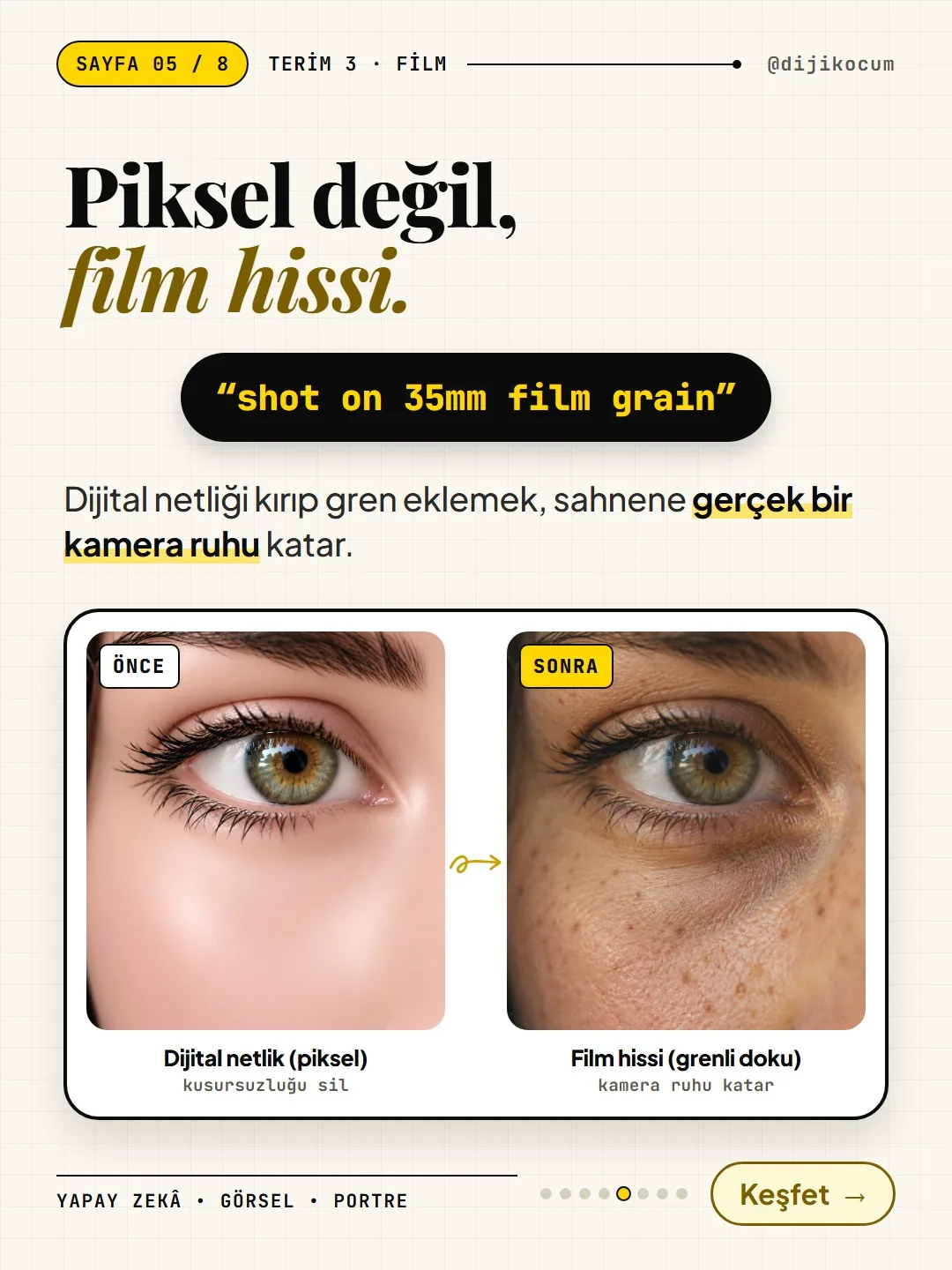
Realism hides in the imperfections. If you don't keep the pores and moles in the skin, you can't give a human feel. This term tells the model to leave pores, moles and small blemishes in; it's the first term that breaks the plastic look.
natural skin imperfectionsTerm 2 · Light: subsurface scattering
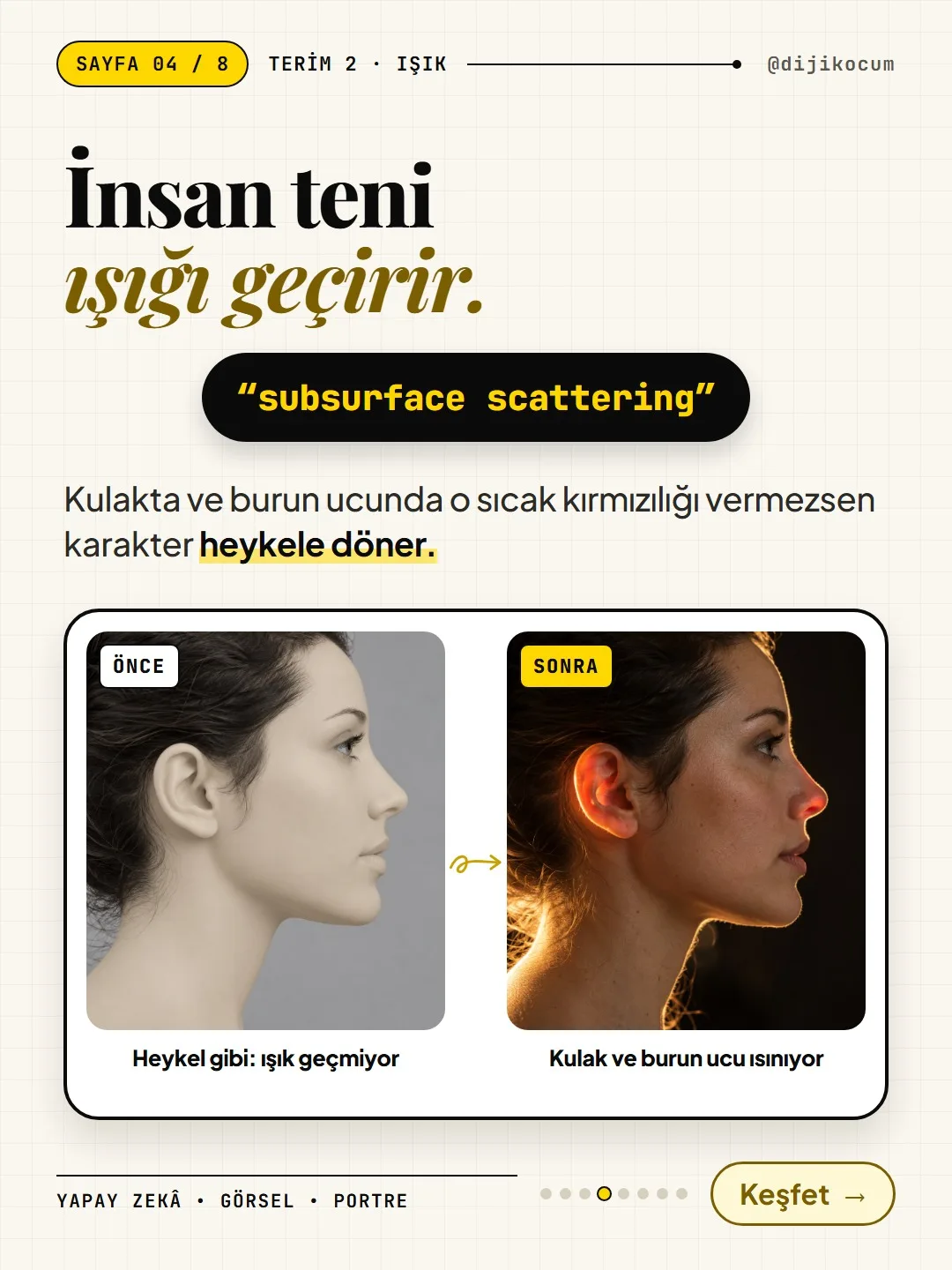
Human skin lets light through. If you don't give the ears and the tip of the nose that warm redness, the character turns into a statue. This term asks for that warm look of light passing through the skin.
subsurface scattering on skinTerm 3 · Film: shot on 35mm film grain
Film feel, not pixels. Breaking digital sharpness and adding grain gives your scene the soul of a real camera. In the template, this appears as two parts: the feel of being shot on a 35mm film camera, and subtle film grain.
shot on 35mm film, subtle film grainTerm 4 · Camera: rembrandt lighting and anamorphic lens
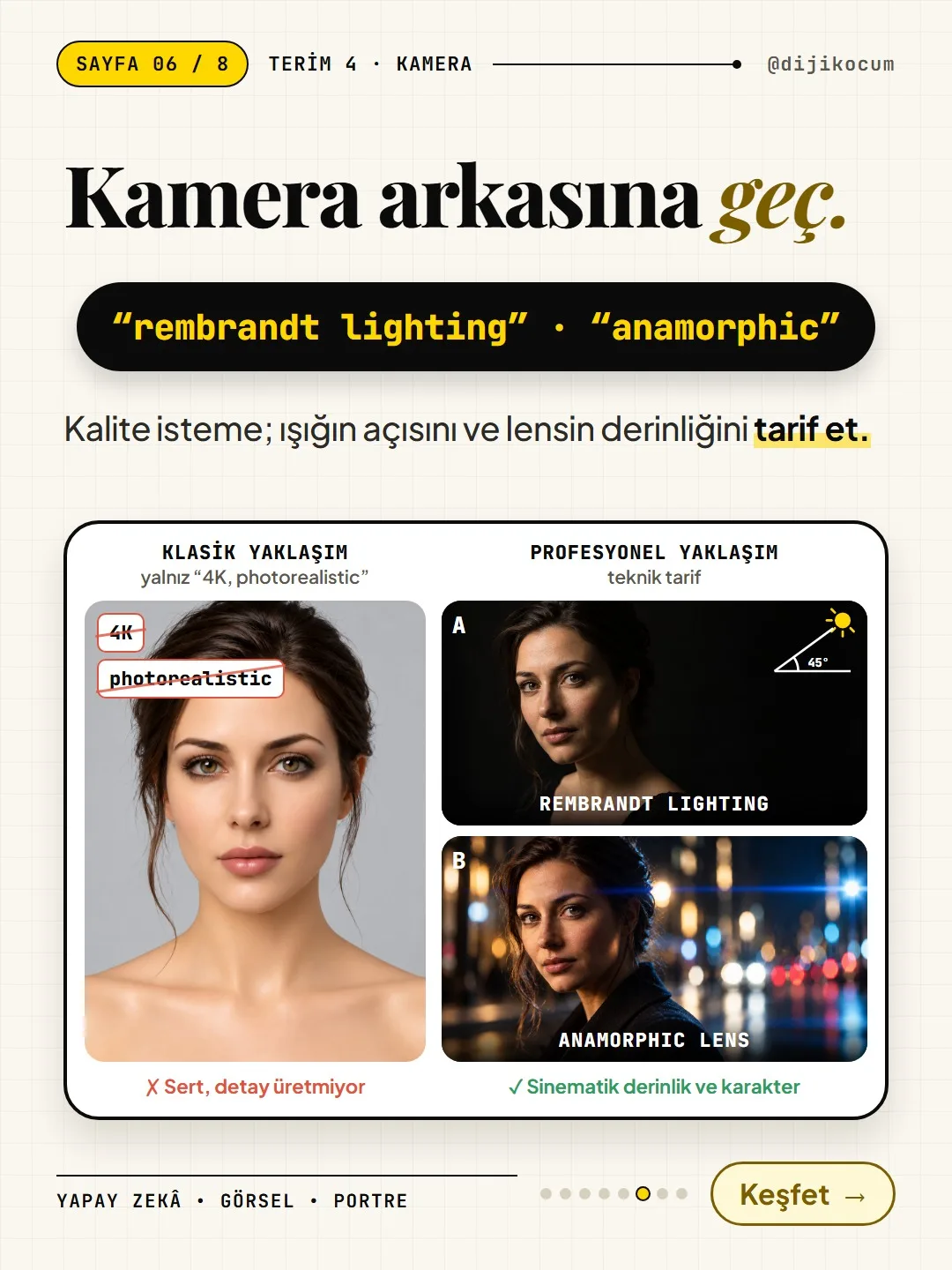
Step behind the camera: don't ask for quality, describe the angle of the light and the depth of the lens. Writing only "4K, photorealistic" gives a harsh, detail-less result. Rembrandt lighting is a single key light coming from 45 degrees to the side and above; it leaves a small triangle of light on the shadowed cheek. An anamorphic lens is a cinema lens: it gives horizontal light streaks and oval background highlights. Together they add cinematic depth and character.
rembrandt lighting, anamorphic lensThe 10-term realistic portrait glossary
The four terms in the carousel and their six companions. They're all already in the template below; know what each one does, and if needed, drop one or move it up front.
- natural skin imperfections → natural skin flaws: pores, moles, small blemishes. This is what breaks the plastic look first.
- visible micro-pores → visible pores. Gives the skin its texture in close-ups.
- peach fuzz → the fine hairs on the face. Makes skin look alive in side light.
- subsurface scattering on skin → light passing through the skin; warm redness on the ears and the tip of the nose. Without it, the face looks like a statue.
- shot on 35mm film → the feel of being shot on a 35mm film camera; softens digital sharpness.
- subtle film grain → light film grain. Real camera texture instead of perfect pixels.
- rembrandt lighting → a single key light from 45 degrees to the side and above; a small triangle of light on the shadowed cheek.
- anamorphic lens → cinema lens: horizontal light streaks, oval background highlights.
- shallow depth of field → shallow depth of field: face sharp, background blurred.
- authentic candid texture → the texture of an unposed, natural moment.
Delete these words from your prompt.
These are the words that iron the skin flat. If you have an old prompt, remove these first and put the glossary terms in their place.
4K, 8K, hyperrealistic, ultra detailed, perfect skin, flawlessThe formula: the full template.
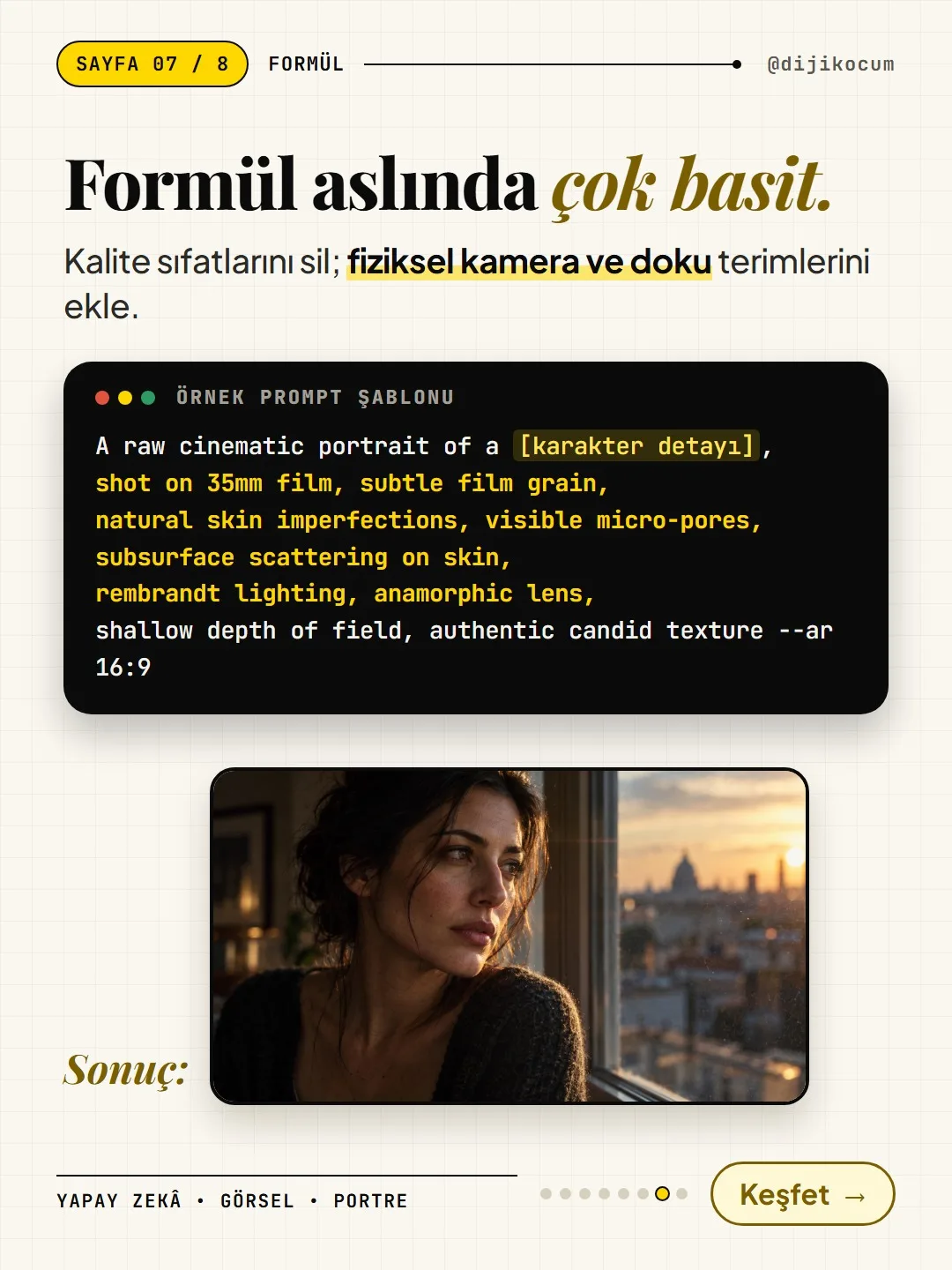
The formula is actually very simple: delete the quality adjectives, add physical camera and texture terms. The result portrait in the carousel was generated with this template, without adding a single extra word.
The only place you need to change in the template is [character detail]. Delete the square brackets and what's inside, and write the person in concrete terms in English: age, hair, clothing, what they're doing, where they are. Example:
woman in her early thirties with dark hair loosely tied back, looking out of a window in late afternoon light.A raw cinematic portrait of a [character detail], shot on 35mm film, subtle film grain, natural skin imperfections, visible micro-pores, subsurface scattering on skin, rembrandt lighting, anamorphic lens, shallow depth of field, authentic candid texture --ar 16:9Open the tool, paste the template, set the aspect ratio.
The template works in an empty chat, without adding a reference image.
- ChatGPT: chatgpt.com → New chat at the top left → paste the template into the message box and fill in the [character detail] part.
- Gemini: gemini.google.com → new chat → paste it the same way.
- Midjourney: use the template as is.
The "--ar 16:9" at the end is Midjourney syntax. In ChatGPT or Gemini, delete it and write "in a horizontal 16:9 aspect ratio" instead; for Instagram, write "in a vertical 4:5 aspect ratio." Press send; the image appears in the same chat, below your message, and you can click it to download.
The same template produces a different face every time; the style and texture stay similar, but no two results are exactly the same. If there's a detail you don't like, say it in one sentence in the same chat, or generate again.
Ready-made example 1 · Hair salon
For a hair salon or beauty salon: a hairstylist checking a cut in the mirror. You can copy and paste it as is; if you're using ChatGPT or Gemini, replace the "--ar 4:5" at the end with "in a vertical 4:5 aspect ratio."
A raw cinematic portrait of a hairstylist in her forties checking a client's freshly cut bob in a salon mirror, scissors in hand, shot on 35mm film, subtle film grain, natural skin imperfections, visible micro-pores, subsurface scattering on skin, rembrandt lighting, anamorphic lens, shallow depth of field, authentic candid texture --ar 4:5Ready-made example 2 · Photographer
For a photo studio or a freelance photographer: a photographer holding a film camera on a street at dusk.
A raw cinematic portrait of a photographer in his late twenties wearing a worn denim jacket, holding a vintage film camera on a city street at dusk, shot on 35mm film, subtle film grain, natural skin imperfections, visible micro-pores, subsurface scattering on skin, rembrandt lighting, anamorphic lens, shallow depth of field, authentic candid texture --ar 4:5Ready-made example 3 · Boutique
For a clothing boutique: a boutique owner arranging a sweater on a rack, in window light.
A raw cinematic portrait of a boutique owner in her thirties arranging a cream knitted sweater on a wooden rack in a small clothing store, soft window light, shot on 35mm film, subtle film grain, natural skin imperfections, visible micro-pores, subsurface scattering on skin, rembrandt lighting, anamorphic lens, shallow depth of field, authentic candid texture --ar 4:5For your own industry: 3 more examples.
The fixed part of the template never changes; you only write the character detail at the start to fit your business. Below are filled-in versions for a cafe, a real estate office and an auto repair shop; copy one of the code boxes and change the person and the place to fit you.
Cafe (a barista making latte art):
A raw cinematic portrait of a barista in his thirties with a short beard pouring latte art into a ceramic cup behind a wooden coffee bar, morning window light, shot on 35mm film, subtle film grain, natural skin imperfections, visible micro-pores, subsurface scattering on skin, rembrandt lighting, anamorphic lens, shallow depth of field, authentic candid texture --ar 4:5Example for a real estate office
A real estate agent holding keys in the living room of an empty apartment:
A raw cinematic portrait of a real estate agent in her fifties with short grey hair standing in the bright, empty living room of an apartment, holding a set of keys, shot on 35mm film, subtle film grain, natural skin imperfections, visible micro-pores, subsurface scattering on skin, rembrandt lighting, anamorphic lens, shallow depth of field, authentic candid texture --ar 4:5Example for an auto repair shop
A mechanic leaning on an open hood in a workshop. One last reminder: get permission before generating the face of a real customer or employee.
A raw cinematic portrait of a car mechanic in his forties with grease on his hands, leaning on the open hood of a car in a small workshop, shot on 35mm film, subtle film grain, natural skin imperfections, visible micro-pores, subsurface scattering on skin, rembrandt lighting, anamorphic lens, shallow depth of field, authentic candid texture --ar 4:5
How to measure it
Generate the same person twice: first the old way ("hyperrealistic 4K portrait, perfect skin"), then with the template here. Put the two results side by side and zoom in: are pores and moles visible, is there warmth on the ears and the tip of the nose, is the background blurred? Compare the saves and comments on the post that uses the image with your previous AI images.
Sources
- DDijiKoçum realistic portrait glossary and template (10 terms, 3 ready-made examples)Our own data · checked: October 29, 2026
[A] primary source · [B] industry research · [C] practitioner · [D] our own data
Frequently asked questions
Why do AI faces look plastic?
Quality words like "4K," "hyperrealistic," "perfect skin" or "flawless" don't make the model add detail; they smooth the skin. Once the pores, moles and light transitions of a real photo are gone, the face looks like a mannequin.
Which tools does this template work in?
You can use it in ChatGPT, Gemini and Midjourney. The "--ar 16:9" at the end is Midjourney syntax; in ChatGPT or Gemini, write "in a horizontal 16:9 aspect ratio" instead, or "in a vertical 4:5 aspect ratio" for Instagram.
Can I write the [character detail] part in Turkish?
Since the rest of the template is in English, it's recommended to write the person in English and in concrete terms too: age, hair, clothing, what they're doing, where they are. The more concrete detail you write instead of a general description, the closer the result gets to reality.
Does the same template always produce the same person?
No. Every generation gives a different face; the texture, light and film feel stay similar. Download the result you like, and ask for small changes in one sentence in the same chat.
Can I generate the face of a real employee or customer?
Always get permission before generating a real person's face. This template was written to describe a fictional person.
Next step
Let’s look at your site together.
Free Digital Checkup: a health score for your website, your ads and your visibility in AI search, plus what to fix first. 3 minutes.
More guides

How-To Guide
How to connect Instagram to Claude: two safe ways to set up comment-to-DM, a DM assistant and scheduled posting (step by step)
15 steps · 11 min

How-To Guide
How to Connect Claude to Gmail, Google Calendar, Drive and Canva: Safe Connector Setup, Step by Step
12 steps · 7 min
How-To Guide
Make your restaurant's Instagram look like a menu: a 6-post feed template and shot list
9 steps · 6 min