3-Shot Short Video Ad (with Timestamps)
Promos and adsFull vertical 9:16 2 tries
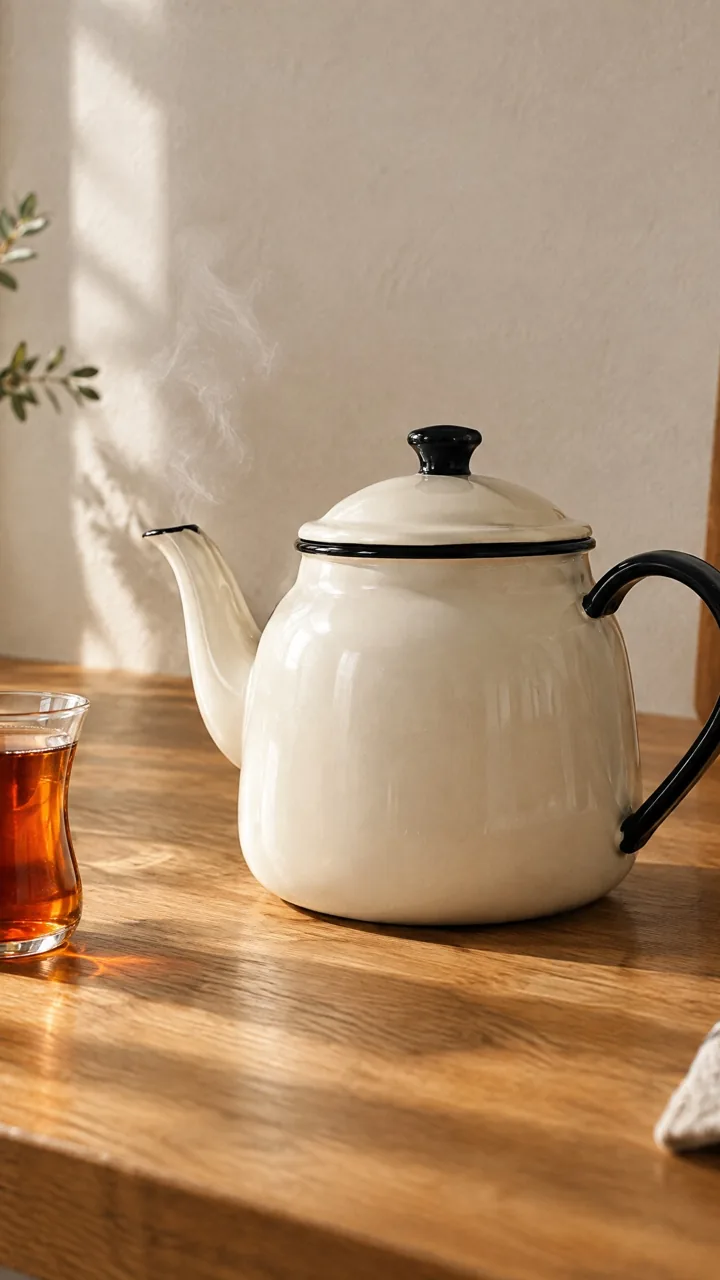
Animate this photo with subtle, realistic motion. Camera: [static, locked-off tripod shot]. Motion: [a thin wisp of steam rises from the teapot spout and from the tea glass], [the sunlight shadows on the wall drift slowly], [the leaves of the plant sway gently]. Everything else stays still and exactly as in the photo: same objects, shapes, colors and composition. Natural speed, no zoom, no new objects, no text.Replace the gold [bracketed] parts to match your own product, space or brand.
The prompt tells the model not to change these. Check the result anyway: these are the parts that break most often.
Don't write motion that isn't in the photo (tea being poured, a door opening, a customer walking in); the model will invent that object. Don't use it if the motion reads as a feature of the product (a fizzing drink, melting cheese) and the product isn't actually like that.
When sharing realistic AI video on Instagram, TikTok or YouTube, turn on the platform's "AI-generated" label.
Turns a product or venue photo you already have into a few seconds of moving video: steam rises, shadows drift, leaves stir. It's the cheapest route to video for Reels and Stories, because no new shoot is needed.
Upload the photo and paste the prompt. The prompt describes only the MOTION; don't re-describe what is already visible in the photo. In the square brackets, change the camera and what should move; only write things that are actually in the photo.
The example was generated with Kling 3.0 via Higgsfield (5 sec, silent).
What happened across attempts: On the first attempt, it came out as subtle as intended: steam rises from the spout in the first seconds and fades, the sunlight shadows on the wall drift, and the objects stay in place. The motion is hard to notice on a phone; if you want it more visible, write "clearly visible steam".
Even with the same prompt and the same settings, you won't get an identical result: models generate something different every time. The example shows what kind of result this prompt produces; it is not a guarantee.


We use cookies to improve the site and measure advertising performance. Analytics and advertising cookies run only if you accept them. Details are in our Privacy Policy and Data Protection Notice.