What Is Kling AI? Is It Free, How Much Is It, How to Use It, Kling 4.0, Turkish and Commercial Use
You describe a scene to Kling or upload a photo; it generates a short video with sound (and images too). It's available on the web, iPhone and Android. On the free plan, users without a subscription get credits each month when they log in, but videos keep a watermark and come with no commercial-use rights; removing the watermark and using videos commercially require a paid plan. The website is available in Turkish, but Turkish speech is not on the official language list.
- What it does
- Generates short videos with sound from text and photos
- Turkish speech
- Not on the official list
- Turkish interface
- Website in Turkish; not in the iOS app
- Commercial use
- Paid plans only
- Where
- Web, iPhone, Android
- Free plan
- Yes; watermarked, no commercial rights
- Price
- Standard $10/month
What does Kling AI do?
You describe a scene or upload a photo; Kling generates a video a few seconds long. Along with the picture, it can also produce sound, speech and ambient audio. It also generates 2K/4K images from text.
You can also set the start and end frames with images, get several camera shots in one generation (Multi-Shot) and have your own character copy the movement from a video (Motion Control). Which version has which limits is covered in the "Which model?" section.
Who it's for: businesses and content creators who want short clips for Reels, ads and product showcases.
What can you make with Kling? Real examples
Give it a photo and a short description of the motion, and you get a 5-second vertical video. All come from the DijiKoçum prompt library: you can copy the prompt text as is and try it with your own photo.

The prompt asked for a camera orbit; the product rotated instead of the camera. The unseen back side is the model's guess. · Ready-made prompt: Product rotation and light sweep

The cross-section and texture are the model's guess; not presented as real footage. · Ready-made prompt: ASMR dessert cutting
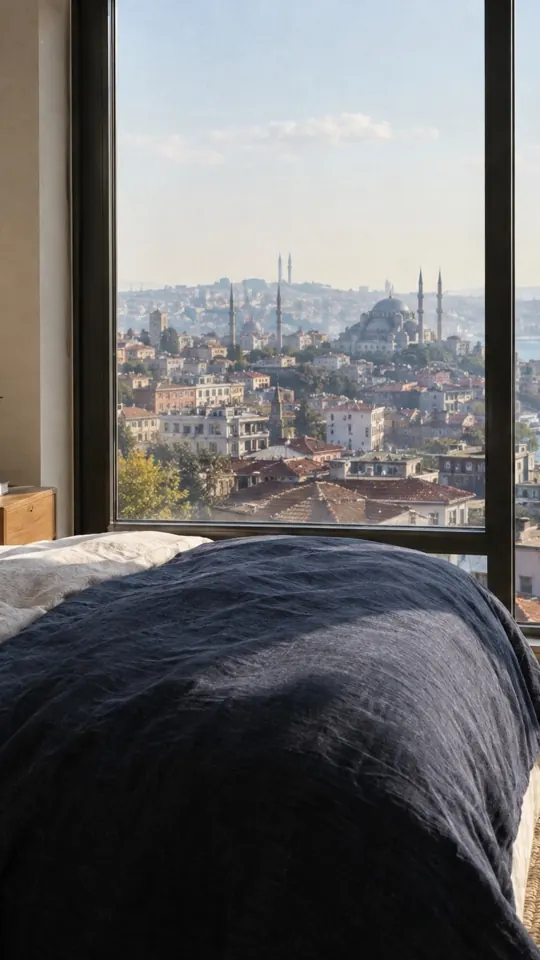
The first attempt added a curtain that wasn't in the photo; adding "only things in the photo should move" to the prompt fixed it. · Ready-made prompt: Hotel room showcase video

The steam and shadows move; everything else stays still. · Ready-made prompt: Photo animation
Real outputThe Kling 3.0 model was run through the Higgsfield API, not on Kling's own site; the same model is available in both places. The input photos were also generated with AI; no real person or business is shown.
How do you download Kling and create an account?
- Open kling.ai. The Turkish landing page is kling.ai/tr. You need an account to generate; the official documentation doesn't list the sign-in methods (email, Google, etc.) or say whether phone verification is required; you'll see them on the sign-in screen.
- Know the age limit. Under the terms, people under 13 can't use it; if you're under the legal age of majority, the account is opened through a parent or guardian. The App Store age rating is 13+.
- Your remaining credits are shown as a number in the left sidebar on the web.
On the App Store as "Kling AI: AI Image&Video Maker" (seller KLING AI PTE. LTD.). Free with in-app purchases; requires iOS 14.0 or later. If you buy a plan in the app, Apple bills you and the local price appears only there; invoice requests aren't supported in the app and must be made on the web.
On Google Play as Kling AI (package kling.ai.video.chat, developer KLING AI PTE. LTD.). The minimum Android version and local prices are on the store page; check them there before downloading.
How do you use Kling? Your first video
- Go to kling.ai or the app and create an account.
- If you have an idea, choose "text to video"; if you have a photo, choose "image to video".
- Write in short sentences: who or what, doing what, where, how the camera moves, what the light is like.
- Choose the length and generate. If a generation fails, the credits are refunded; if you don't like the result, change one thing and generate again.
When making a video from a photo, don't describe the scene from scratch; the look is already in the photo. Kling's own guide recommends writing the motion, camera and sound for image-to-video.
Kling prompt examples
Kling's own guide recommends this frame: subject + motion + setting + camera + lighting and atmosphere. For dialogue in videos with sound it gives the format [Rider, calmly] says, "…", and for sound effects the format [Motorcycle] accelerates + [Sound Effect: engine rumble].
Kling's examples and guide are in English. The official documentation doesn't say how well Turkish prompts work: if you write prompts in Turkish, start with a short test and switch to English if the result is off.
More ready-made prompts: image and photo prompt examples
Which models does Kling use? 3.0, 4.0 and Flash compared
Kling offers several model versions; the pricing page and the release notes give different versions different access. The table uses the tool's own descriptions.
| Model | In Kling's own words | Length / resolution | Which plan |
|---|---|---|---|
| Kling VIDEO 3.0 and 3.0 Omni | Generates video and audio together, smart scene planning, Element reference | 3–15 s · 720p/1080p/4K | All plans, with credits; 1080p/4K with a subscription |
| Kling 4.0 | More stable motion, 10 keyframes, 15 references (10 images, 5 videos, 7 elements), two-channel audio, editing | 3–30 s · 720p/1080p/4K · 21:9 | Limited early access; full release said to be October 2026 |
| Kling 4.0 Flash | Fast, cost-efficient generation | 3–20 s · 720p only | Early access for a limited group; the pricing page also lists it for yearly Ultra |
| VIDEO 2.6 – Voice Control | Control the voice of a speaking character | Not stated on the pricing page | Free for subscribers |
| Kling Image 3.0 and 3.0 Omni | Series and batch images, direct 2K/4K output | 2K / 4K | With credits; 4K with a subscription |
- If a short clip is enough (up to 15 s) and you work mainly from prompts, the 3.0 family; Kling's own comparison also points to 3.0 for short generations.
- If you need a longer scene (30 s), many references, keyframe control or editing an existing video, 4.0 (provided your access is enabled).
- If a quick test at low resolution is enough, 4.0 Flash (720p, 3–20 s).
Credits are deducted by model, length and resolution; the official documentation doesn't give a table of how many credits each model costs. Subscribers may get model discounts during promotions.
Which models are available depends on your account; 4.0 is rolling out gradually along with the new creation screen. The official documentation doesn't walk through the selection screen: before generating, check the model and credits shown on screen.
The model list changes often; this section was checked on October 15, 2026 (Kling 4.0 release notes, the 4.0 vs. 3.0 comparison article, the pricing page). 4.0's 10-bit HDR output and video extension up to 2 minutes are marked "coming soon" in the release notes. There is also a 3.0 Turbo release note.
Is Kling free? Plans, credits and pricing
Partly. On the free plan (Basic), users without a subscription get credits each month when they log in, valid for 31 days; neither the pricing page nor the Credits Policy states the amount. But videos keep a watermark; watermark removal, commercial use, 1080p/4K, video extension and 4K images are subscription-only.
- Credits each month on login (amount not stated)
- 1 video per generation, 30 Elements
- Watermark removal
- Commercial use
- 1080p/4K
- Video extension
- 660 credits/month
- No watermark, commercial use
- 1080p/4K, 4 videos per generation
- Fast generation, unlimited task queue
- 3,000 credits/month
- Everything in Standard
- Priority access to new features
- 8,000 credits/month
- Same rights as Pro
- 26,000 credits/month
- Beta testing invitations
View as a table (yearly price, first-month discount)
| Plan | Monthly | Yearly | Monthly credits |
|---|---|---|---|
| Standard | $10 (first month $6.99, then $8.8) | $79.2 | 660 |
| Pro | $37 (first month $25.99, then $32.56) | $293.04 | 3,000 |
| Premier | $92 (first month $64.99, then $80.96) | $728.64 | 8,000 |
| Ultra | $180 (first month $127.99, then $159.99) | $1,429.99 (yearly includes Kling 4.0 Flash early access) | 26,000 |
- Deduction: Credits are deducted at generation time based on the model, number of outputs, length and resolution. The official documentation doesn't give a table of how many credits a video costs; check what's shown on screen before generating.
- Failed generation: Credits are refunded.
- Validity: Subscription credits last about a month (31 days on the pricing page, 1 month in the Credits Policy); purchased credits 2 years; promotional credits for the period stated on the promotion page. When subscribers get daily bonus credits, those credits expire at 24:00 that day. Credits that expire sooner are used first.
- Add-on packs: Standard rate $1 = 66 credits. Credits alone don't remove the watermark or unlock 1080p; those are subscription features.
- When the subscription ends: Unused monthly credits are deleted; purchased credits remain until they expire.
The pricing page has no tax line; the official documentation doesn't cover tax on web payments or restrictions on paying by card from Turkey, so check the amount on the checkout screen. For an invoice on the web: Subscription Management › Purchase History › Request Invoice (10 business days); invoice requests aren't supported in the app. No student discount is listed on the official pages; the first-month discount is one-time only.
Is Kling available in Turkish? Can it make videos speak Turkish?
| Landing siteYes | kling.ai/tr is in Turkish; the site offers 12 languages in total. |
|---|---|
| iOS app languageNo | App Store language list: Simplified Chinese, Traditional Chinese, Japanese, Korean, English. |
| Logged-in interfaceUnclear | The official documentation doesn't say whether the generation screen is in Turkish. |
| Turkish promptsUnclear | There's no official list of prompt languages; Kling's examples are in English. |
| Turkish speech (voice and lip sync)Unclear | 3.0's list: Chinese, English, Japanese, Korean, Spanish. 4.0's list adds Portuguese, German, French and Hindi and says "and more"; Turkish is not named. |
If you want a video that speaks Turkish, you can try generating the voice in another tool and giving it to Kling as an audio reference; 4.0 accepts only audio references. The official documentation doesn't say how well this works in Turkish, so start with a short test.
What does Kling do with the images I upload? Data and privacy
Data is stored on servers in Singapore; support and moderation teams are in various parts of the world.
Under the Terms, content you upload and publish is not treated as confidential or proprietary: don't upload confidential content. For features involving portraits, facial feature points such as the eyes, nose and mouth can be extracted from the uploaded material.
The Terms of Use say Kling may process inputs and outputs to improve the service and its AI models. If you don't want that, you can withdraw consent by emailing support@kling.ai. The official documentation doesn't mention a separate settings toggle.
Content you publish may be opened to others on the platform through "Recreate"; you choose its visibility in Kling's settings.
The Privacy Policy has an additional section for Turkey: the data controller's representative is support@kling.ai, and the legal bases for processing are listed under Article 5 of Law No. 6698 (KVKK, Turkey's Personal Data Protection Law).
In the app: My Space › profile › Account Deletion. This can't be undone.
!Get permission before using someone else's photo or voice: the Terms require you to declare that you own the rights to what you upload or have legal permission from the owner.
Watch out for: Pro APKs
!Don't download "Kling pro apk", "mod" or "premium apk" files. Official distribution is the web, the App Store and Google Play; paid features are unlocked by a subscription tied to your account, not by an outside file.
- If a generation fails, your credits are refunded; if credits were still used and no result came back, contact support: support@kling.ai.
- Purchased credits don't remove the watermark; the watermark and commercial rights depend on a subscription.
- Kling 4.0 is still rolling out gradually: if you can't see a feature in your account, you may not be in early access.
Can Kling videos be used in ads? Watermark
- With a paid subscription (Standard and up), you can use, reproduce, distribute, modify and create derivatives of the output commercially.
- With a paid subscription, you can remove the brand watermark.
- The free Basic plan has no commercial-use rights and the watermark stays.
- You can't use it to build a product or service that competes with Kling.
- You can't use the output to train or improve another AI model (Terms of Use).
- You can't use output about a person in decisions affecting them, such as credit, employment, housing, insurance, legal or health decisions.
!Before commercial use, it's up to you to determine whether your use complies with laws, industry rules and platform policies: portrait rights, copyright, trademarks, advertising rules and "made with AI" labels. You also declare that you own the rights to the images and audio you upload.
This section summarizes Kling's official terms (pricing page FAQ, Terms of Paid Service October 10, 2026, Terms of Use April 21, 2026); it is not legal advice.
How do you cancel a Kling subscription, and are there refunds?
- Web (Stripe): Profile › Manage Plan › Cancel Subscription.
- iPhone: Settings then Apple ID then Subscriptions then Kling then Cancel Subscription.
- Android: Google Play › profile › Payments & subscriptions › Subscriptions › Kling › Cancel subscription.
- If you turned on automatic credit top-ups, turn them off: Profile › Credits › Auto-Recharge Management › Turn off. It turns off on its own when the membership ends.
Once a paid service is activated, fees are not refunded; credits are not refunded or converted to cash either. When you cancel, the subscription ends at the end of the current billing period. If you don't cancel before the renewal date, the next period is charged automatically.
Kling or another video tool?
Frequently asked questions
Is the Kling Pro APK safe, and where do you download Kling?
No. The official app is only on the App Store and Google Play (KLING AI PTE. LTD.), and on the web at kling.ai. Paid features are unlocked by a subscription tied to your account; "pro apk" files downloaded elsewhere are not official.
Can Kling make videos speak Turkish?
Turkish isn't named in the official language lists: 3.0 lists five languages, 4.0 lists seven and "more". The official documentation doesn't say how well Turkish works; try a short test, or generate the voice in another tool and give it as an audio reference.
How do you use Kling?
Create an account at kling.ai or in the app, choose "text to video" or "image to video", write in short sentences who is doing what, the setting, the camera and the light, then choose the length and generate.
Is Kling free, and how many credits does it give per day?
Partly. Users without a subscription get credits each month when they log in (valid for 31 days), but the amount isn't stated in the official sources. Daily bonus credits are only for subscribers and during events. On the free plan the watermark stays, and there's no commercial use or 1080p/4K.
How much does Kling cost?
On the web, in US dollars: Standard $10/month ($6.99 for the first month), Pro $37, Premier $92, Ultra $180.
How do you write a Kling prompt?
Kling's guide recommends the order subject, motion, setting, camera and lighting. For image-to-video, don't describe the scene; write the motion and camera. Kling's examples are in English; the official documentation doesn't say how well Turkish prompts work.
How many credits does a video cost in Kling?
The official documentation gives no table: credits are deducted by model, number of outputs, length and resolution. Check the amount shown on screen before generating. Credits are refunded for failed generations.
How do you remove the watermark in Kling?
By switching to a paid subscription (Standard and up). Buying credits doesn't remove the watermark.
Is Kling 4.0 out?
Gradually. According to the release notes, the full model is due in October 2026; the new creation screen has been available to a limited number of users since September 28, 2026, and 4.0 Flash is in early access. The pricing page lists 4.0 Flash early access for yearly Ultra.
How do you cancel a Kling subscription, and are there refunds?
If you subscribed on the web, Profile › Manage Plan › Cancel Subscription; on iPhone, Settings › Subscriptions; on Android, Google Play › Payments & subscriptions. Once a paid service is activated, fees and credits are not refunded.
Tasks and setup kits that use Kling AI
Related guides


Sources
- Kling membership plans and FAQ
- Kling Credits Policy
- Kling Terms of Use
- Kling Terms of Paid Service
- Kling Privacy Policy
- Kling 4.0 release notes
- Kling 4.0 vs. 3.0 comparison
- Kling prompt guide
- Kling: text-to-video and image-to-video
- Kling 3.0 Omni audio and lip sync
- Kling Turkish site
- App Store listing
Not clear in the official sources: The amount of monthly free credits for users without a subscription · length and resolution limits on the free plan · how many credits a video costs · sign-up methods and phone verification · whether the logged-in interface is in Turkish · how well Turkish prompts and Turkish speech work · Kling 4.0's full release date and which plans get it · tax on web payments and payment restrictions from Turkey · Android local prices · student discount. Each is covered in its section, along with what you can do.