What Is Higgsfield and How Do You Use It? Image and Video Generation, Models, Free Plan, Credits and Claude Connection
Higgsfield is a site that generates images, video and audio from a sentence you write or a photo you upload. It is used to change the background of a product photo, place a product in a setting, animate a photo, build a character that keeps the same face in every piece, or make an ad video from a product link. Alongside its own tools, it brings other companies' models together in a single subscription. It only works in the browser; it also connects to Claude, ChatGPT and Cursor.

- What it does
- Generates images, video and audio
- What you give it
- A written prompt or a photo
- Turkish interface
- No (EN, ES, JA, KO, DE)
- Replies in Turkish
- Not stated in the official documentation
- Where
- Web only; no mobile app
- Turkey
- Not stated in the official documentation
- Free plan
- Yes; limited, watermarked
- Price
- Starter $15 · Plus $49 ($39 billed yearly)
What is Higgsfield for?
Higgsfield presents itself as a creative suite: you generate images and video from text or a photo, and turn them into audio. Whether it's a single image or an ad video, everything happens on one site and is paid for from a shared credit pool. A credit is the numeric allowance each generation spends (depending on model, resolution and duration).
The site's own tools, as Higgsfield describes them:
Who it's for: content creators, small businesses and agencies that need to produce lots of images and videos for ads, social media or websites. No coding needed: the first generation is just a prompt and an optional reference image.
The help pages don't say which tools (Cinema Studio, Marketing Studio, Canvas, Supercomputer, audio) are available on which plan; the relevant section explains what you can do.
What can you make with Higgsfield? Real examples
These outputs were generated with Higgsfield for the DijiKoçum Prompt Examples library. The ready-made prompt for each example is in the library.


The cups' shape and speckles are preserved; only the background changes · Ready-made prompt: Changing the background without altering the product



Two photos are combined: the product and the setting · Ready-made prompt: Combining two photos
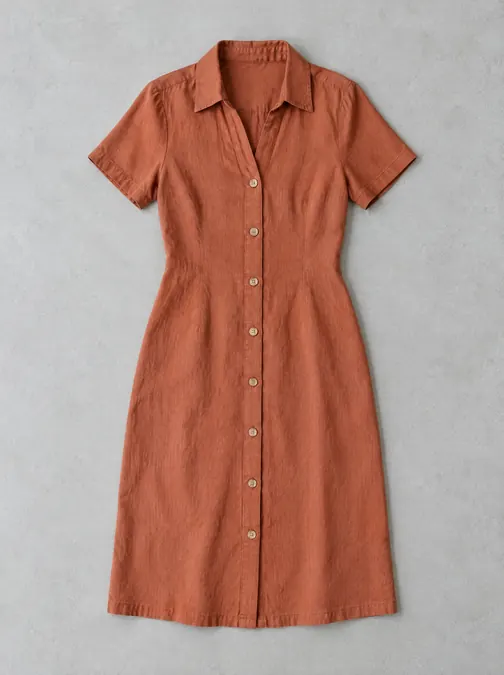
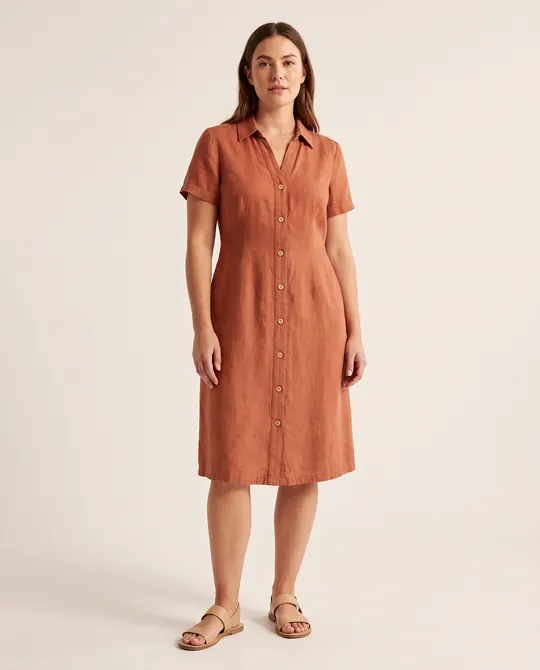
The model is fictional; no real person was used · Ready-made prompt: Dressing a model in a garment

5 seconds, 9:16, sound off; the steam and shadows move, everything else stays still · Ready-made prompt: Animating a photo
Real outputThe images were generated with AI. The examples were generated through Higgsfield's API; on the site, the same models are selected in the Image and Video sections.
How do you download Higgsfield and create an account?
!Higgsfield has no official mobile or desktop app; the platform runs in the browser at higgsfield.ai. Apps in the stores named 'Higgsfield' are not official; Higgsfield's own help page also treats them as copycats. Enter your password and payment details only on higgsfield.ai.
- Open higgsfield.ai, click Sign up and continue with Google, Apple, Microsoft or email.
- If you signed up with email, you'll get a 6-digit verification code; check your spam folder too. Don't share the code with anyone.
- You must be 18 or older (or the age of majority where you live). The same email can't be used for two accounts; the email address can't be changed later.
- When signing in, use the method you signed up with. If you forget your email password, reset it with Forgot password.
- In Claude or Claude Desktop, go to Settings then Connectors then Add custom connector.
- Enter Higgsfield as the name and paste the address below into the URL field.
- Click Connect and authorize with your Higgsfield account. If you're already signed in, this step happens automatically.
› https://mcp.higgsfield.ai/mcpAn active paid subscription is required. A connector with any other address is not Higgsfield's.
- ChatGPT: find the Higgsfield plugin in the Plugins Directory or click Add Higgsfield plugin on the higgsfield.ai/mcp page; click Add and authorize with your account. Audio generation and Website Building are not available in ChatGPT.
- Cursor: find Higgsfield under Customize then Marketplace, click Add and sign in with your account.
› npm i -g @higgsfield/cli› higgsfield auth login› npx skills add higgsfield-ai/skillsIn Claude Code, OpenClaw and Hermes, the agent does these steps itself. An active paid subscription is required; no API key is needed.
How do you use Higgsfield?
- Sign in; choose Image or Video from the top menu.
- Pick a model or feature. If you're not sure, start with the default; you can change the model later.
- Write what you want. If the model supports it, upload a reference photo.
- Set the duration, aspect ratio (vertical 9:16, horizontal 16:9, square 1:1) and resolution.
- Click Generate. The credits you'll spend are shown on the button before you click.
- The result stays both on the generation screen and in the Assets section. If it gets stuck, cancel the generation and try again.
| What you want to do | Tool Higgsfield recommends |
|---|---|
| Cinematic video with camera control | Cinema Studio |
| An ad from a product link or photo | Marketing Studio |
| Keeping the same character across many clips | Cinema Studio + Soul ID |
| Chaining several models into a template | Canvas |
| Running a project end to end from a single chat | Supercomputer |
| Generating from Claude or a coding agent | MCP or CLI + Skills |
!Review generated results before publishing; models make mistakes, and details like text, fingers and logos can come out distorted.
Which model? Model families on Higgsfield and how they differ
Alongside its own models, Higgsfield offers other companies' image, video and audio models in the same place. You don't have to pick each model individually: you choose a family, and Higgsfield makes the newest version of that family the default. Credit use varies by model, resolution and duration.
| Image model | What it's for, per Higgsfield | Credits (from the pricing page) |
|---|---|---|
| Soul | Fashion, cinematic and culture-focused images; character consistency | Soul 2.0: 0.12 per image |
| Nano Banana | Fast results, strong reference control | Nano Banana Pro 2 (4K: 4); Nano Banana 2: 2 |
| GPT Image | Legible text and accurate color | 1 |
| Seedream | Visual reasoning on complex, detailed prompts | 1 |
| Popcorn | Storyboards and multi-frame layouts | 1.5 |
| FLUX | Speed-focused detail | FLUX.2 Pro 1; Flex 3; Max 4 |
| Video model | What it's for, per Higgsfield | Credits (approximate, from the pricing page) |
|---|---|---|
| Seedance | Realistic human motion and expression; the most 'forgiving' starting point for beginners | 2.0, 720p: ~22 / 5 sec · 2.0 Fast 720p: ~12 |
| Kling | Cinematic, long or multi-shot clips; transferring one video's motion to another | 3.0, 720p: ~7 / 5 sec · 1080p: ~8 · 4K: ~30 |
| Higgsfield DOP | VFX and directed camera movement with presets | Lite 720p: ~3 / 3 sec |
| Wan | Precise control over the first and last frame | 3.0, 720p: 8.75 / 5 sec |
| Grok Imagine | Video with synced audio | Grok Video: ~7 / 5 sec |
| Sora | OpenAI's video model | Sora 2, 720p: ~10 / 4 sec |
| Veo | Google's video model | Veo 3.1 Fast 720p: ~16 / 4 sec |
| Minimax Hailuo | Fast, high-dynamic video | Hailuo 2.3 Fast 768p: ~4 / 6 sec |
Audio is in the Audio section: text-to-speech, voice changing and translation into 18 languages. As Higgsfield describes them, Seed Audio produces voice, music and effects together from a single prompt; Eleven highlights emotion-controlled voice, and Seed Speech multilingual voice. The official sources don't list which languages are included.
- Fashion and cinematic images, the same character: Soul
- Fast images, product and reference work: Nano Banana
- Legible text in the image: GPT Image
- Realistic human motion: Seedance
- Cinematic or long clips: Kling
- You set the first and last frame: Wan
A free account has a small set of models (the official sources don't give the list). Starter accesses only selected models; Plus and Ultra get all models and features. Some new models roll out gradually and may not appear for everyone at first.
In most tools you can switch the model from the generation screen at any time; your earlier generations aren't deleted and stay in Assets. The cost for each model is shown on the Generate button.
The model list and descriptions are from Higgsfield's model guide; credit values are the approximate numbers marked '~' on the pricing page. Model versions change often; this section was checked on October 14, 2026. Try two models on your own work and compare.
How does Higgsfield work with Claude and ChatGPT? MCP, CLI and API
MCP is an open standard that lets AI assistants talk to external services. If you add the Higgsfield MCP connector, you generate images and video from inside Claude, ChatGPT or Cursor; the results also land in Assets in your Higgsfield account. No API key is needed; authorization is done with your account. Setup steps are in the Account and getting started section.
| Image and video generationYes | Works in Claude, ChatGPT, Cursor and the CLI; results are saved to Assets. |
|---|---|
| Soul charactersYes | Usable through all four routes. |
| Audio generationNot in ChatGPT | Available in Claude, Cursor and the CLI; not in the ChatGPT plugin. |
| Website building skillNot in ChatGPT | Available in Claude, Cursor and the CLI; not in the ChatGPT plugin. |
| Unlimited and free generationsWeb only | Every generation made through MCP, the CLI, Canvas and Supercomputer spends credits. |
- CLI + Skills: for coding agents (Claude Code, Cursor, Codex). Three skills are included: image/video generation, Soul character training and product photo shoots. It uses the same account and credits.
- API: for developers who want to embed generation in their own app; completely separate from the subscription. You top up a prepaid dollar balance, and each request is deducted from it. Plans, credits and Unlimited don't apply to the API. Console: open.higgsfield.ai.
!When connected through MCP and the CLI, you are responsible for the generations the agent makes with your account, and they all spend credits. Keep the connection secure; ask the agent about the credit cost of tasks before you hand them over.
About Claude itself: see the Claude guide for plans, connectors and Turkish support.
Is Higgsfield free? Plans, credits and pricing
You can open a free account and generate, but it's limited: you only get a small set of models, you have no monthly credits, and every output carries a Higgsfield watermark. There is no trial period. From the plans on the pricing page and the help center:
- A small set of models
- Character (1 generation at most)
- 1 concurrent job
- Monthly credits
- Commercial use (per the pricing table)
- Watermark-free output
- Fast queue
- 200 credits/month
- Selected models
- 2 videos + 4 images concurrently
- Commercial use, fast queue
- All models
- Start-end frame control
- 1,000 credits/month
- All models and features
- 6 concurrent videos
- Start-end frame control
- 7-day Unlimited on some models
- 3,000 credits/month
- All models and features
- 8 concurrent videos
- 7-day Unlimited on more models
- 1,200 generations per character
View as a table (credits and concurrent jobs)
| Plan | Monthly price | Monthly credits | Concurrent videos | Character generations |
|---|---|---|---|---|
| Free | $0 | 0 | 1 | 1 at most |
| Starter | $15 | 200 | 2 | 80 |
| Plus | $49 ($39 billed yearly) | 1,000 | 6 | 400 |
| Ultra | $129 ($99 billed yearly) | 3,000 | 8 | 1,200 |
For teams, the Team plan starts at $65 per seat per month (2-15 seats, shared credit pool); Enterprise is available for larger organizations. Prices exclude VAT and local taxes, which are added at checkout based on your billing location. Credit cards, debit cards, Apple Pay and, where supported in your region, bank payments are accepted. There is no official Turkish lira price, since there is neither a Turkish pricing page nor an App Store app.
- Subscription credits reset at renewal and don't roll over to the next month. On a yearly plan, the reset happens every 30 days.
- Credit packs (extra purchases) and auto-refill credits are valid for 90 days and remain even if the subscription ends. Subscription credits are spent first, then those with the nearest expiration date.
- Free and Unlimited generations apply only on the higgsfield.ai site. Every generation you make through Claude, ChatGPT, the CLI, Canvas or Supercomputer spends credits, whatever your plan.
- If a generation fails, the credits usually come back automatically. To check, look at Manage Account › Usage.
- Unlimited runs in the standard queue at peak hours; in credit mode, generation runs in the priority queue and is fastest. Unlimited is for personal use only; automation and account sharing are prohibited.
The watermark depends on the account type: it's on every generation in a free account and absent on any paid plan. To get a watermark-free version, you need to switch to a paid plan and generate again; watermark removal for a single output isn't sold. In addition, invisible markers showing the content is AI-generated may be added; these don't go away with an upgrade.
Source: Higgsfield pricing page and help center (October 14, 2026). The pricing page sometimes shows a yearly billing and promotional discount banner; promotions change, so check the current price on the page before paying.
Does Higgsfield support Turkish?
| Turkish interfaceNo | The site's language options are English, Español, 日本語, 한국어 and Deutsch (as shown in the language menu on October 14, 2026). Only the cookie notice appears in Turkish. |
|---|---|
| Turkish prompts and outputUnclear | The official sources don't say whether prompts can be written in Turkish; it depends on the model you choose. Try a short Turkish prompt, and if it doesn't work, write in English. |
| Turkish voice and dubbingUnclear | The translation tool says 18 languages but doesn't give the list; Turkish isn't mentioned. On a paid account, check the language list in the Audio section. |
| Turkish support and helpUnclear | The help center is in English. Whether there is Turkish-language support is not stated in the official documentation. |
- Access and payment from Turkey: the official sources don't list country restrictions or supported countries. Payment is via Stripe by card, Apple Pay and, where supported in your region, bank payment; tax is added based on your billing location.
- Turkish lira price: none. Prices are in US dollars, excluding tax.
- If you're buying on behalf of a company, you can add a VAT or tax ID under Manage Account › Subscription; with a valid number, tax is usually removed from the invoice, but this varies by country and you should consult your accountant. Invoices issued before you add it don't change.
What happens to what I upload and generate on Higgsfield?
Under section 4.4 of the terms of use (as summarized by the help center), Higgsfield may use your content for model training; under Enterprise agreements, customer content is not used for training. No opt-out setting is described: if you delete content or your account, use stops going forward; it can't be removed from models already trained.
Manage Account › Personal Profile › Manage Account Deletion. After confirming, you can undo it by signing in again within 30 days; after that it's permanently deleted. The subscription is canceled automatically and remaining credits are lost. Download your generations before deleting.
In face and voice features, the face or voice print generated is used only to run that feature; it is not stored or sold (Privacy Policy, Biometric Information section). The photos and characters you upload are stored as regular content.
Content you submit to a contest, campaign or community post becomes public and may be featured by Higgsfield.
The official sources say nothing about KVKK (Turkey's Personal Data Protection Law) or which country data is kept in. For GDPR (EU/UK) and CCPA requests: privacy@higgsfield.ai; data export only in GDPR and UK regions.
!Get permission before uploading face photos of customers, students or anyone else. Use only your own photo or the photo of someone who has given permission.
Can I use what Higgsfield generates in my business?
According to the help center (terms of use, 4.4), you own the outputs and Higgsfield doesn't restrict their commercial use: you can use them in ads, social media, client work and product images. A separate commercial license isn't sold.
- Using outputs in ads, brand content and client work
- Selling outputs and transferring them to clients
- Keeping your rights to what you generated even after the subscription ends
- Training or fine-tuning an AI model with the outputs
- Uploading someone else's photo without permission
- Trying to generate copyrighted characters and brands
- Reselling or sharing the account, or using Unlimited through automation
!The official sources contradict each other here: the help center says commercial use doesn't depend on the plan, but the comparison table on the pricing page shows the 'Commercial use' row as 'not included' on the Free plan and 'included' on Starter, Plus and Ultra. Free account outputs carry a watermark anyway. Use a paid plan for commercial work, and for critical work ask Higgsfield support for written confirmation.
- Outputs aren't guaranteed to be unique to you: others may generate similar outputs.
- You're responsible for not infringing third parties' copyright, trademark and image rights.
- Legal protection (IP indemnification) is only on the Enterprise plan.
Source: Higgsfield help center, 'Who owns my generations' (October 14, 2026) and the pricing page. This is not legal advice.
Common problems and fixes
| What happens | What to do |
|---|---|
| Generation stuck in the queue | Hover over the generation › Cancel, then try again. Most hangs clear on their own within a few minutes. |
| 'Something went wrong' error | Refresh the page, complete the captcha and try again. If it persists, hard-refresh with Ctrl+Shift+R, try a private window and another browser, and turn off ad blocker and VPN extensions. |
| 'You've reached the concurrent generation limit' warning | Your plan's concurrent job limit is full. Cancel a queued generation or wait for one to finish. |
| Blocked for copyright or IP reasons | Don't write character, brand, sports team or artist names; describe the look instead. Remove logos and branded products from the reference image. |
| Harmless content flagged as NSFW | Write the prompt more neutrally, change the reference image, provide it together with text, or try another model. Trying to bypass the filter is prohibited. |
| Generation failed; are my credits gone? | They usually come back automatically within a few minutes. Confirm the refund under Manage Account › Usage; if it's not there, write to support with your account email and the approximate time. |
| I had an Unlimited model, but generating from Claude spent credits | This is expected behavior: Unlimited and free generations apply only on the higgsfield.ai site. |
| The download button doesn't work | Turn off ad blocker, VPN or privacy extensions and allow downloads for higgsfield.ai in your browser. |
| I can't get into my account | Sign in with the method you used to sign up (Google, Apple, Microsoft or email). Reset your email password with Forgot password. The registered email can't be changed later. |
| Credits didn't refresh | On a monthly plan they refresh when payment goes through; on a yearly plan, every 30 days. If payment fails, the subscription goes past due and no credits are added; check under Manage Account › Subscription. |
| I paid for a Higgsfield app in an app store | There is no official app; purchases happen only on higgsfield.ai. Higgsfield won't activate or refund anything bought elsewhere. If you entered your password, reset it and contact support. |
How do you cancel a Higgsfield subscription, and are there refunds?
- Click your avatar at the top right › Manage Account.
- On the Subscription tab, scroll to the bottom: Plan Settings then Manage Subscription then Show then Cancel Subscription.
- Canceling turns off auto-renewal; you keep using it until the end of the period, and then the account moves to the free tier. Your account and generations aren't deleted.
Refunds are possible but narrow: within 7 days of the first purchase (or longer if the law where you live gives more time), only if you haven't spent any credits and only for the first purchase; a service fee of up to 6% is deducted and the subscription is canceled immediately. Renewals are not refunded. There are no partial refunds: if you drop a yearly plan months in, you use it until the end of the period. If you bought a yearly plan by mistake, you need to contact support right away. Free generations and Unlimited generations don't affect your refund eligibility.
- On cancellation, your subscription credits expire permanently at the end of the period; credit packs and promo credits can be used on the free tier until they expire.
- If you want a cheaper plan, downgrade from the comparison section on the Pricing page instead of canceling; a downgrade starts with the next invoice. An upgrade takes effect immediately and is charged pro rata for the remaining time.
- If you delete the account entirely, the subscription is canceled automatically and remaining credits are lost.
What can it do? Feature map (by plan)
The list below shows each feature: whether it's ready on the site, whether it's reached through another tool, and whether it's available on a free account. Having a free account doesn't mean every feature is free.
Generation
- Generate images from text or a reference imageLimited on the free planImage (saved to Assets) · Free account has a small set of models, 0 credits, watermarked; credits spent depend on the model
- Generate video from text or an imagePlan terms not clearVideo · Which video models are available on a free account isn't listed in the official sourcesWhat you can do: Choose the model on the Video screen; check the credit info on the Generate button and the lock on the model. A free account has 0 credits.
- Train a character that keeps the same face across all images and videosLimited on the free planReusable character · Trained with 20-80 photos; character generation allowance by plan is 1 / 80 / 400 / 1,200
Special tools
- Make cinematic video with camera control, or an ad video from a product link (Cinema Studio, Marketing Studio)Plan terms not clearCinematic video, ad video, product image · The help pages don't say which plan includes themWhat you can do: If the tool opens on the site, it works; if it's locked, check the comparison table on the pricing page and the credit info on the Generate button.
- Text-to-speech voiceover, voice changing, translation (18 languages) and talking charactersPlan terms not clearAudio file, talking character video · Plan requirement not stated in the official sourcesWhat you can do: Open the Audio and Lipsync Studio pages on the site; the Generate button shows the credit cost. Turkish support isn't stated; run a short test.
- Chain models on a node board (Canvas) or have a job done end to end from a chat (Supercomputer)Plan terms not clearChained generations, ready assets · Plan requirement not stated in the help pages; generations spend creditsWhat you can do: Check the "How much does Supercomputer cost" FAQ item on the pricing page and the Generate button in your own account.
From other tools
- Have Higgsfield generate images and video from Claude, ChatGPT or CursorRequires a connectionOn paid plansImages and video (saved to Assets) · Active paid subscription required; every generation spends credits
- Generate images and video via commands from a coding agent (Claude Code, Cursor, Codex)Requires separate setupOn paid plansImages and video · Paid subscription; installed with npm
- Connect generation to your own app via the APIRequires separate setupOn paid plansImages and video via the API · No subscription; prepaid dollar balance, pay per request
Labels: "Requires a connection" means linking another account or app; "Requires separate setup" means installing a separate program. Pricing is listed per feature; a product having a free plan doesn't mean every feature is free. Compiled from official sources on October 14, 2026.
Higgsfield or another tool?
Frequently asked questions
Is Higgsfield free?
Partly. You can open a free account, but it's limited: a small set of models, no monthly credits and a watermark on every output. There is no trial period. Watermark-free output and more models require a paid plan: Starter $15, Plus $49 ($39 billed yearly), Ultra $129 ($99 billed yearly).
What is Higgsfield and what is it for?
An AI site that generates images, video and audio from text or photos. Alongside its own tools (Soul ID characters, Cinema Studio, Marketing Studio, Canvas, Supercomputer), it offers other companies' models in a single subscription.
How do you use Higgsfield?
Create an account on higgsfield.ai, choose Image or Video, pick a model, write your prompt, add a reference photo if needed and click Generate. The credits to be spent are shown on the button; the result is stored in Assets.
How much does Higgsfield cost, and what are the plans?
Starter $15/month (200 credits), Plus $49/month or $39/month billed yearly (1,000 credits), Ultra $129/month or $99/month billed yearly (3,000 credits). For teams, from $65 per seat per month. Prices exclude tax; there is no Turkish lira pricing.
Does Higgsfield work in Turkish?
The interface isn't in Turkish: the site is in English, Spanish, Japanese, Korean and German. Whether Turkish prompts and voice work is not stated in the official documentation; a short test will tell.
How do you connect Higgsfield to Claude and ChatGPT?
In Claude, add the https://mcp.higgsfield.ai/mcp address via Settings > Connectors > Add custom connector and authorize with your account. ChatGPT has an official Higgsfield plugin, and Cursor has a marketplace listing. An active paid subscription is required; every generation spends credits.
Is there a Higgsfield app, and where do you download it?
No. Higgsfield has no official mobile or desktop app; it's used only in the browser at higgsfield.ai. Apps named 'Higgsfield' in the stores are not official.
How do you use the Higgsfield API, and do you need a subscription?
The API is a separate product from the subscription. You load a prepaid dollar balance, and each request is deducted from it; plans, credits and Unlimited don't apply to the API. Console at open.higgsfield.ai, docs at docs.higgsfield.ai.
How do you cancel a Higgsfield subscription, and are there refunds?
Manage Account > Subscription > Plan Settings > Manage Subscription > Cancel Subscription. You keep using it until the end of the period. Refunds only for the first purchase, within 7 days and if no credits were spent; the service fee is up to 6%, and renewals aren't refunded.
Is there a Higgsfield discount code?
The pricing page shows a yearly billing discount and sometimes a promotional banner. Credits from codes become 'promo credits' with an expiration date. Third parties selling accounts, credits or Unlimited are not official; Higgsfield won't activate or refund them.
How do Higgsfield credits work, and what happens when they run out?
Each generation spends credits depending on model, resolution and duration; the cost is shown on the Generate button. Subscription credits reset every period and don't roll over. When they run out, you can buy a credit pack, turn on auto-refill or upgrade your plan.
What is Higgsfield Supercomputer?
A workspace where you describe the job in a chat and the agent makes a plan, generates images, video and audio, and delivers them. It can connect to apps like Telegram, Slack, Gmail and Drive. The help page doesn't say which plan it's available on; generations spend credits.
Related guides


Sources
- Higgsfield pricing page
- What is Higgsfield
- Official Higgsfield platforms
- Account creation and sign-in
- First generation
- How plans work
- How credits work
- Unlimited models
- Watermark
- Credit packs
- Billing
- VAT and tax ID
- Which model
- Soul ID
- Audio, voiceover, aspect ratios
- Which tool
- Supercomputer
- Canvas
- Cinema Studio
- Marketing Studio
- Connecting to Claude, ChatGPT and agents
- What is MCP
- CLI
- API
- Ownership and commercial use
- Privacy and data requests
- Account deletion
- Cancellation
- Refunds
- Partial refunds
- Upgrading and downgrading plans
- Stuck generation
- NSFW flag
- Copyright block
- Site won't load
Not clear in the official sources: Whether commercial use is allowed on a free account (the help center and the pricing table contradict each other) · which models are available on a free account · which plan includes Cinema Studio, Marketing Studio, Canvas, Supercomputer and audio · support for Turkish prompts, voice and dubbing · access and payment terms from Turkey · student or education discounts · details of the terms of use page. Each is covered in its section along with what you can do.